This post contains affiliate links, marked with *. As an Amazon Associate I earn from qualifying purchases, at no extra cost to you. It helps keep the tutorials free.
Quick Summary
An overview of the main microcontroller programming types: graphical tools (Arduino Blocks, Scratch), text-based C/C++ (Arduino IDE, PlatformIO), MicroPython/CircuitPython, and professional IDEs (MPLAB, STM32CubeIDE, Keil). Find out which approach fits your skill level and project needs, from absolute beginner to advanced embedded systems work.
From the anti-lock brakes in your car to the thermostat on your wall, microcontrollers run the modern world. These small chips only do what they are told, though. So telling them what to do is what microcontroller programming is all about. There are several microcontroller programming types to choose from, and the method you pick will shape how fast you learn and how much control you have over the hardware.
In this guide, I walk through the main microcontroller programming types. That includes beginner-friendly graphical tools, text-based languages like C/C++ and Python, low-level assembly, and the integrated development environments (IDEs) that tie everything together. By the end, you will know which approach fits your skill level and project goals. You will also have concrete examples to get started right away.
What this article covers
After reading this article, you will understand the five main microcontroller programming types. In addition, you will learn the differences between graphical, low-level, high-level, and scripting approaches, plus how IDEs connect these workflows. On top of that, you will find a side-by-side comparison table, practical code examples for Arduino and ESP32, a use-case decision guide, and answers to common questions about how to program a microcontroller.
What is microcontroller programming?
A microcontroller is a small computer on a single integrated circuit. Specifically, it has a processor (CPU), memory (RAM and flash), and input/output peripherals, all on one chip. Some well-known examples are the ATmega328P on the Arduino Uno, the ESP32 used for Wi-Fi and Bluetooth projects, and the RP2040 inside the Raspberry Pi Pico.
Microcontroller programming is the process of writing instructions that the chip’s processor runs. Those instructions tell it to read sensors, control motors, communicate with other devices, or carry out whatever your project needs. Unlike desktop software, however, microcontroller code usually runs in a continuous loop with no operating system. As a result, the programmer is directly responsible for timing, memory management, and hardware interaction. Understanding the different microcontroller programming types helps you pick the right tool for each job.
There is no single “best” microcontroller programming type. Instead, the right choice depends on your experience level, the complexity of your project, and whether you care more about ease of learning, execution speed, or low-level hardware control. The sections below break down every major approach so you can decide for yourself.
Overview of the main microcontroller programming types
Microcontroller programming types fall into five broad categories: graphical (block-based) programming, assembly and low-level programming, high-level compiled languages, scripting and interpreted languages, and IDE-based workflows. Each one serves a different purpose. For instance, graphical tools lower the barrier for beginners, while assembly gives engineers maximum control. Similarly, high-level languages like C and C++ balance readability with performance. Scripting languages such as MicroPython speed up prototyping. And modern IDEs bundle the editor, compiler, debugger, and upload tools into one environment, so any language is easier to work with.
Graphical programming for microcontrollers
What is graphical programming?
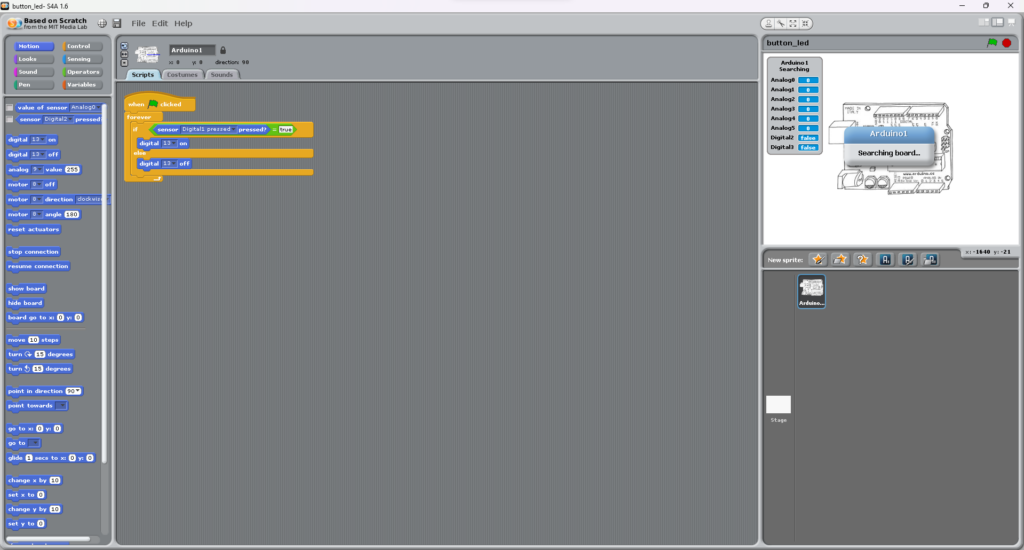
Graphical programming replaces typed code with visual drag-and-drop blocks. Each block represents a concept like a loop, a conditional, a variable, or a hardware command. You snap them together to build a program, much like assembling puzzle pieces. Because the environment prevents syntax errors and makes logic visible at a glance, it is one of the easiest ways to start learning to code.
Who is it for?
Graphical programming works well for absolute beginners, younger students, and educators who want to teach computational thinking without text-based syntax getting in the way. In addition, it is useful for artists, designers, and hobbyists who want to experiment with hardware quickly. If you have never written a line of code before, starting with blocks helps you pick up core programming patterns — loops, conditionals, functions, and variables — before moving to a text-based language.
Popular graphical programming tools
Scratch, developed by the MIT Media Lab, is one of the most popular graphical programming environments out there. Scratch itself is mainly aimed at creating animations and games on a computer. However, extensions like S4A (Scratch for Arduino) let you control physical hardware from within the Scratch interface.
Blockly, created by Google, is an open-source library that powers the drag-and-drop editors in many educational platforms. It can generate real code in JavaScript, Python, Lua, or other languages behind the scenes. Because of this, it is a natural stepping stone from blocks to text.
Arduino Create (block-based mode) and similar platforms let you build code for Arduino boards by dragging blocks, then upload the result directly to the microcontroller. This is especially helpful for beginners who want to focus on the creative side of electronics instead of wrestling with code syntax. If you are just getting started with Arduino-based electronics, our guide on building a line following robot for beginners shows how real projects come together once you understand the basics of programming your board.
Advantages of graphical programming
Visual blocks make abstract ideas concrete, so learners pick up logic faster. The drag-and-drop approach is also interactive enough to keep students motivated. On top of that, it removes the barrier of text-based syntax, which opens coding up to younger learners and non-native English speakers. Graphical programming also allows rapid prototyping — you can test and tweak ideas almost instantly, which is useful in both educational and creative settings.
Limitations and when to move beyond blocks
As projects grow more complex, however, the block-based interface starts to feel clunky. Nesting dozens of blocks makes the workspace messy and hard to manage. Furthermore, graphical environments lack fine control over hardware registers, memory, and timing that text-based languages give you. As a result, most learners naturally move on to text-based programming — usually C/C++ or MicroPython — once they are comfortable with the basics. Think of graphical programming as a launchpad rather than a long-term home.
Assembly and low-level programming
What is assembly language?
Assembly language is a low-level programming language that maps almost directly to the machine instructions a microcontroller’s processor runs. Rather than writing binary ones and zeros, you write short human-readable mnemonics like MOV, ADD, and JMP. The assembler then translates those into machine code. Because each assembly instruction matches a single CPU operation, the programmer controls exactly what the hardware does on every clock cycle.
Why assembly offers maximum control
Because there is no abstraction layer between your code and the hardware, assembly lets you squeeze every bit of performance out of a chip. For example, you can manage individual CPU registers, configure peripherals at the bit level, and write timing routines accurate down to a single clock cycle. This matters in areas where performance and deterministic timing are non-negotiable — for instance, signal processing, safety-critical automotive systems, or extremely memory-constrained devices.
Why assembly is harder for beginners
The same lack of abstraction that makes assembly powerful also makes it hard. The code is verbose: a task that takes one line in Python might take dozens of lines in assembly. Moreover, it is architecture-specific, so code written for an AVR chip (Arduino) will not run on an ARM chip (STM32) without a full rewrite. On top of that, debugging is more complex, and reading someone else’s assembly code is notoriously tough. For these reasons, assembly is rarely the first language a beginner picks up.
Where assembly is still relevant today
Even with the rise of high-level languages, assembly has not gone away. It still shows up in bootloaders, interrupt service routines that must finish in a fixed number of cycles, device driver initialization, and embedded security firmware. In addition, many professional embedded C projects include small sections of inline assembly for time-critical or hardware-specific work. As a result, learning even a little assembly gives you a better sense of how microcontrollers actually operate under the hood.
High-level languages for microcontrollers
Among the different microcontroller programming types, high-level languages are the most popular. They add a layer of abstraction over the hardware. Instead of working with individual registers and memory addresses, you use readable constructs like variables with descriptive names, for-loops, functions, and libraries. The compiler or interpreter then translates those into machine instructions. As a result, code is faster to write, easier to read, and more portable across different hardware platforms.
Embedded C and C++
C and C++ dominate the embedded and microcontroller world. In fact, the Arduino programming language is a simplified framework built on top of C/C++, which is why most Arduino tutorials you find online use this language family. C gives you low-level access to hardware (pointers, direct register manipulation) while still providing structured features like functions and data types. Meanwhile, C++ adds object-oriented capabilities, classes, and templates that help organize larger codebases.
Because C/C++ offers strong performance, hardware control, and broad compiler support, it is the default choice for production embedded systems. If you have worked through any of our Arduino tutorials — for instance, our servo motor control with joystick and OLED display project — you have already been writing C/C++ code, even if the Arduino IDE made it feel simpler.
Python, MicroPython, and CircuitPython
Python is one of the most popular programming languages in the world, largely because of its clean, readable syntax and gentle learning curve. MicroPython and CircuitPython are lean versions of Python 3 built to run directly on microcontrollers like the ESP32, RP2040, and various SAMD-based boards.
With MicroPython, you can type commands into a live REPL (Read-Eval-Print Loop) connected to your board and see results instantly. In other words, no compilation step is required. This interactive workflow makes MicroPython great for prototyping, education, and any situation where fast iteration matters more than raw speed. However, the trade-off is that interpreted Python code runs much slower than compiled C and uses more memory, which can be a problem on smaller chips.
JavaScript and other scripting languages
JavaScript has also carved out a niche in IoT (Internet of Things) microcontroller development through platforms like Espruino and the Johnny-Five framework. Its event-driven model fits naturally with devices that spend most of their time waiting for sensor input or network messages. Similarly, Lua, another lightweight scripting language, is popular in the NodeMCU firmware for ESP8266 and ESP32 boards. Although these scripting languages are not as widely adopted as C or MicroPython for microcontrollers, they are worth knowing about if your background is in web development.
Trade-offs: memory, speed, readability, and hardware control
Every microcontroller programming type involves trade-offs. For example, C and C++ compile to tight, efficient machine code that runs fast and uses little RAM, but the code is harder to write for beginners. On the other hand, MicroPython and CircuitPython are more readable and faster to develop with, but they need more memory and run slower. Assembly gives you unmatched control at the cost of portability and development speed. Likewise, graphical tools are the easiest to start with but the hardest to scale. The comparison table later in this article lays out these trade-offs side by side.
IDEs and development environments for microcontrollers
Language vs. compiler vs. IDE: understanding the difference
Before looking at specific tools, it helps to clarify three terms that beginners often mix up. First, a programming language (like C++ or Python) defines the syntax and rules you use to write code. Second, a compiler or interpreter is the software that translates your human-readable code into machine instructions the microcontroller can run. Third, an IDE (Integrated Development Environment) is the application you sit in front of: it bundles a code editor, the compiler or interpreter, upload tools, a serial monitor, and often a debugger into one workspace. You can use the same language with different IDEs, and many IDEs support more than one language.
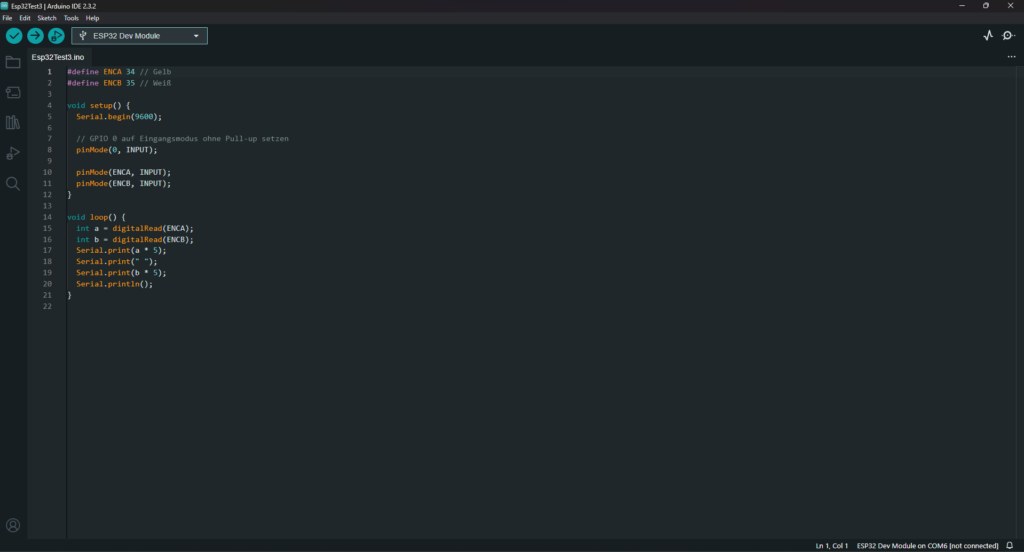
Arduino IDE
The Arduino IDE is the most popular development environment for hobbyist microcontroller programming. It supports C and C++, has a simple one-click upload button, includes a serial monitor for debugging, and offers a large library ecosystem through the built-in Library Manager. Furthermore, version 2.x added auto-completion, an integrated debugger, and a more modern interface. For anyone just starting out with microcontrollers, the Arduino IDE is usually the first tool people recommend. Many of our tutorials at OmArTronics, including the Arduino IR remote LED and servo door project, use the Arduino IDE as the development environment.
PlatformIO
PlatformIO is an open-source ecosystem that runs as an extension inside Visual Studio Code. It supports hundreds of boards (Arduino, ESP32, STM32, and more), and it also offers features like unit testing and static code analysis. On top of that, it manages libraries and toolchains automatically. If you outgrow the Arduino IDE and want a more powerful setup without switching languages, PlatformIO is a solid next step.
Thonny and MicroPython environments
Thonny is a lightweight Python IDE with built-in support for MicroPython. It can detect a connected MicroPython board, open a live REPL, upload scripts, and manage files on the microcontroller’s filesystem. In short, it handles everything from a clean, minimal interface. For ESP32 or Raspberry Pi Pico projects using MicroPython, Thonny is usually the fastest way to get started.
Professional IDEs
In commercial embedded development, engineers often use vendor-specific IDEs like STM32CubeIDE (for STM32 chips), MPLAB X (for Microchip PIC and dsPIC microcontrollers), or Keil MDK (for ARM Cortex-M devices). These tools offer hardware breakpoints, real-time variable watches, peripheral register views, and sometimes RTOS-aware debugging. Although they are overkill for hobby projects, knowing they exist gives you a fuller picture of the microcontroller programming tool landscape.
Microcontroller programming types: comparison table
The table below summarizes each microcontroller programming type so you can compare them at a glance.
| Method / Language | Difficulty | Hardware Control | Execution Speed | Readability | Best For | Typical Platforms |
|---|---|---|---|---|---|---|
| Graphical (Scratch, Blockly) | Very Easy | Limited | N/A (generates code) | Very High (visual) | Education, first-time learners | Arduino (via S4A, Blockly), micro:bit |
| Assembly | Very Hard | Maximum | Fastest | Low | Time-critical routines, bootloaders | AVR, PIC, ARM (architecture-specific) |
| C / Embedded C | Moderate | High | Very Fast | Moderate | Production firmware, Arduino projects | Arduino, ESP32, STM32, PIC |
| C++ | Moderate–Hard | High | Very Fast | Moderate | Complex projects, OOP-based design | Arduino, ESP32, STM32 |
| MicroPython / CircuitPython | Easy | Moderate | Slower (interpreted) | Very High | Prototyping, education, IoT | ESP32, RP2040, SAMD boards |
| JavaScript (Espruino, Johnny-Five) | Easy–Moderate | Moderate | Slower | High | IoT, web-integrated devices | Espruino boards, ESP8266 |
Best microcontroller programming type by use case
Different goals call for different microcontroller programming types. Here is a practical decision guide based on common scenarios.
Best for absolute beginners: Start with graphical block-based programming (Scratch or Blockly) to build confidence with logic and loops, then move to the Arduino IDE with C/C++. This two-step path has the most community support and documentation in the microcontroller world.
Best for education and classroom settings: Graphical programming paired with physical computing kits (Arduino, micro:bit) gives students a hands-on way to learn. Teachers can use block-based tools for younger learners and then introduce the Arduino IDE for intermediate students.
Best for robotics projects: C/C++ through the Arduino IDE or PlatformIO is the standard. Robotics demands real-time motor control, sensor fusion, and communication protocols — all areas where compiled C/C++ works best. For an example that combines motors, sensors, and Bluetooth, see our OmObiArm Bluetooth-controlled robot arm tutorial.
Best for performance-critical embedded systems: Embedded C or C++ compiled with vendor toolchains (STM32CubeIDE, MPLAB X, Keil) gives you the tightest control over memory and execution timing. You can add small sections of inline assembly where cycle-accurate performance is needed.
Best for fast prototyping and IoT: MicroPython on an ESP32 or Raspberry Pi Pico lets you write readable code, test interactively via the REPL, and iterate in seconds rather than minutes. It is a strong choice when development speed matters more than runtime performance.
Practical examples
The examples below show what code looks like in the three most common microcontroller programming types. They are intentionally simple — in each case, the code blinks an LED so you can compare syntax and structure without distraction.
Arduino (C/C++) — blink an LED
// Arduino C/C++ -- Blink the built-in LED
void setup() {
  pinMode(LED_BUILTIN, OUTPUT);  // Set LED pin as output
}

void loop() {
  digitalWrite(LED_BUILTIN, HIGH);  // Turn LED on
  delay(1000);                      // Wait one second
  digitalWrite(LED_BUILTIN, LOW);   // Turn LED off
  delay(1000);                      // Wait one second
}
This is the classic first sketch every Arduino beginner writes. The setup() function runs once at power-on, and then loop() repeats forever. The Arduino framework handles the low-level hardware initialization behind the scenes, so you can focus on logic.
ESP32 with MicroPython — blink an LED
# MicroPython on ESP32 -- Blink an LED on GPIO 2
from machine import Pin
from time import sleep

led = Pin(2, Pin.OUT)

while True:
    led.value(1)   # Turn LED on
    sleep(1)        # Wait one second
    led.value(0)   # Turn LED off
    sleep(1)        # Wait one second
Notice how the MicroPython version reads almost like plain English. There is no separate setup and loop structure; instead, you just write a while True loop. The machine module gives you direct access to GPIO pins. You can also type this code line by line into the Thonny REPL and watch each command take effect in real time.
Graphical blocks for beginners
In a graphical environment like Blockly or S4A, the same blink program looks roughly like this in pseudo-block form: a “forever” loop block containing a “set pin 13 HIGH” block, a “wait 1 second” block, a “set pin 13 LOW” block, and another “wait 1 second” block. No typing is required — you just drag each block into place. Behind the scenes, however, the tool generates real C/C++ or JavaScript code and uploads it to the board.
Frequently asked questions (FAQ)
C and C++ are by far the most common. The vast majority of production embedded firmware, Arduino sketches, and ESP32 projects are written in C or C++. These languages offer an excellent balance of performance, hardware access, and portability.
Strictly speaking, no. The Arduino programming language is a set of C/C++ functions and libraries (known as the Arduino framework) that simplify common tasks like reading pins and communicating over serial. When you write an Arduino sketch, you are writing C/C++ code that is compiled by a standard C++ compiler.
Yes. MicroPython and CircuitPython let you run Python 3 code directly on supported microcontrollers like the ESP32, Raspberry Pi Pico (RP2040), and various Adafruit SAMD boards. You can even interact with the chip through a live REPL, typing commands and seeing results immediately.
For most beginners, starting with the Arduino IDE and its C/C++ framework is the best path because of the enormous community, endless tutorials, and affordable hardware. If you already know Python, MicroPython on an ESP32 or RP2040 is an excellent alternative that lets you leverage your existing skills.
A programming language is a set of rules and syntax for writing instructions. An IDE is the software application where you write, compile, debug, and upload your code. The Arduino IDE, for example, is the tool; C/C++ is the language you use inside it. You can use the same language in multiple IDEs.
More common questions about microcontroller programming
No. The vast majority of microcontroller projects can be completed entirely in C/C++ or MicroPython without ever writing a line of assembly. However, a basic understanding of assembly helps you appreciate how the hardware works at the lowest level and can be useful for debugging or optimizing time-critical code.
MicroPython is the original Python 3 implementation for microcontrollers, started by Damien George. CircuitPython is Adafruit’s fork of MicroPython with an emphasis on beginner-friendliness, consistent board support, and integration with Adafruit hardware. The core language is almost identical; the differences lie in supported boards, library naming conventions, and community focus.
The Arduino Uno is the classic recommendation for beginners because of its simplicity, massive community support, and compatibility with virtually every tutorial. If you want built-in Wi-Fi and Bluetooth from day one, the ESP32 development board is an excellent and affordable choice. For MicroPython enthusiasts, the Raspberry Pi Pico offers great value.
Yes. With the PlatformIO extension installed, Visual Studio Code becomes a powerful microcontroller IDE supporting Arduino, ESP32, STM32, and many other platforms. PlatformIO handles toolchain installation, library management, and board detection automatically.
No. While graphical tools like Scratch and Blockly are popular in K–12 education, they are also used by adult beginners, artists, and rapid-prototyping teams. However, for serious or complex projects, most users eventually transition to text-based programming for better control and scalability.
Conclusion
As you can see, microcontroller programming types are not one-size-fits-all. On one end, graphical tools give beginners a gentle, visual on-ramp. On the other end, assembly offers unmatched hardware control for specialized use cases. In between, high-level languages like C/C++ dominate real-world embedded development because they balance performance with readability. Meanwhile, MicroPython and CircuitPython make microcontroller programming feel as approachable as desktop scripting. And modern IDEs tie the whole workflow together, from writing code to flashing firmware.
If you are brand new, my recommendation is simple: pick up an Arduino Uno, install the Arduino IDE, and work through your first blink sketch in C/C++. Once you are comfortable with the basics, expand into sensors, actuators, and communication — our DIY 6-DOF robotic arm with Bluetooth control tutorial is a great next challenge. After that, try MicroPython for quick prototyping on an ESP32, or move to PlatformIO for a more professional development setup.