
This post contains affiliate links, marked with *. As an Amazon Associate I earn from qualifying purchases, at no extra cost to you. It helps keep the tutorials free.
In the video below, I build the circuit in two stages: first the joystick moves the two servos without a display, then I add the OLED. The written steps cover the finished version with the display.
The video loads from YouTube (Google), which may set cookies. Privacy policy
Quick summary
You will build a two-axis servo controller on an Arduino Uno: a joystick moves two SG90 servos, and an SSD1306 OLED shows the angle sent to each servo. The project covers analog input, servo control and an OLED on the I2C bus, which needs only two signal wires. The same circuit is the base for a pan-tilt camera mount or a small robot arm.
What you will learn
- How the joystick module provides two analog axes (X and Y).
- How the Arduino reads the joystick values and maps them to servo angles with the
map()function. - How to wire two SG90 servos and an SSD1306 OLED to an Arduino Uno.
- How the OLED shows the angle sent to each servo while you move the joystick.
- How to power the servos from an external 5 V supply with a common ground.
- How to stop jitter (small, unwanted servo movements) at center with a dead zone: a range around the center value in which the code ignores small joystick changes.
- How to reverse an axis or limit the servo range.
How the circuit works
Four parts form the control loop:
- Joystick module: It contains two potentiometers (variable resistors), VRx for the X-axis and VRy for the Y-axis. Each one outputs a voltage between 0 and 5 V, which the Arduino reads as a value from 0 to 1023.
- Arduino Uno: It runs the sketch (an Arduino program). The sketch reads both values, converts them to angles from 0 to 180 degrees with
map(), sends the angles to the servos and updates the OLED. - Two servo motors: Each servo receives a PWM (pulse-width modulation) signal from its own Arduino pin. The signal is a pulse every 20 ms; its width, about 0.5 to 2.4 ms in the Arduino Servo library, sets the angle. The X-axis controls the servo on D9, the Y-axis the servo on D10.
- SSD1306 OLED display: The OLED is a 128×64 pixel screen. It talks to the Arduino over I2C: SDA carries the data, SCL the clock signal.
One pass of the loop takes 50 ms plus the time to refresh the OLED, so the servos follow the joystick without a visible delay. New to servos? The Arduino Servo Control Guide explains the basics.
Components needed
| Component | Quantity | Purpose | Notes |
|---|---|---|---|
| Arduino Uno (or Nano) | 1 | Main microcontroller board | Any Arduino with the ATmega328P microcontroller chip works |
| Joystick module (XY + SW) | 1 | Two-axis analog input | Provides VRx, VRy and an optional push button (SW) |
| Servo motor (SG90 or MG90S) | 2 | Actuators for the X and Y axes | Small hobby servos rated for 4.8 to 6 V |
| OLED display (SSD1306, I2C) | 1 | Shows the angle sent to each servo | 128×64 pixels, 3.3 to 5 V |
| Breadboard + jumper wires | as needed | Wiring | Male-to-male and male-to-female jumper wires |
| External 5 V supply | 1 | Servo power | At least 2 A for two servos |
Wiring diagram
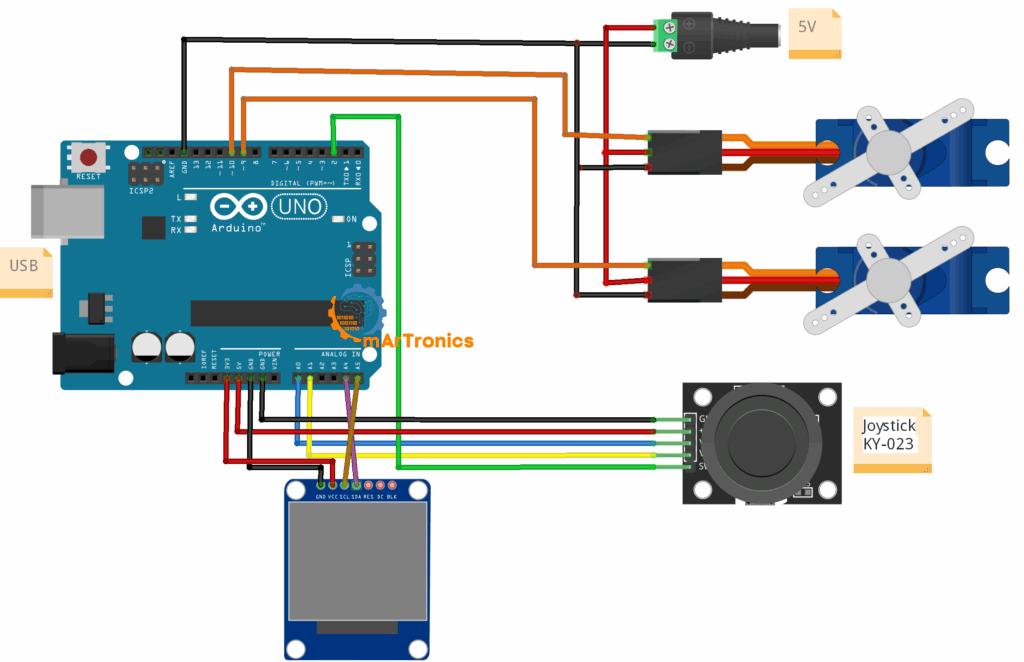
Connect the components as listed in the table. If you are new to Arduino wiring, read Arduino Programming Basics first.
| Component pin | Arduino pin | Notes |
|---|---|---|
| Joystick VRx | A0 | X-axis analog output |
| Joystick VRy | A1 | Y-axis analog output |
| Joystick SW | D2 (optional) | Push button, not used in this sketch |
| Servo 1 signal | D9 | PWM output for the X-axis servo |
| Servo 2 signal | D10 | PWM output for the Y-axis servo |
| OLED SDA | A4 | I2C data line |
| OLED SCL | A5 | I2C clock line |
| Servo +V (both) | External 5 V | Do not power servos from the Arduino 5 V pin |
| Servo GND (both) | Common GND | Connect external supply GND to Arduino GND |
Important wiring notes:
- External 5 V supply for the servos: An SG90 draws about 100 mA when it moves freely and up to about 650 mA when it stalls. A stalled servo is blocked and cannot reach its target. Two stalled servos draw up to 1.3 A, while a USB port supplies 500 mA. The result is voltage drops, servo jitter or board resets. Use an external 5 V supply rated for at least 2 A.
- Common ground: The GND of the external supply, the Arduino GND and all component GND pins must be connected together. Without a common ground, the servos have no reference for the signal voltage and respond erratically or not at all.
- I2C pull-ups: Most SSD1306 modules have pull-up resistors on SDA and SCL. A pull-up resistor holds the line at a defined voltage when no device pulls it low. If your display has none, add 4.7 kΩ pull-ups to 3.3 V or 5 V.
Programming the Arduino
Before uploading, install these libraries in the Arduino IDE (the program you use to write and upload sketches): Servo (built in), Adafruit GFX and Adafruit SSD1306. Open Sketch > Include Library > Manage Libraries, search for Adafruit SSD1306 and click Install. Accept the prompt to install Adafruit GFX as well.
Full code
Paste the code into a new sketch in the Arduino IDE and upload it to the Uno.
#include <Servo.h>
#include <Adafruit_GFX.h>
#include <Adafruit_SSD1306.h>
// OLED setup
#define SCREEN_WIDTH 128
#define SCREEN_HEIGHT 64
Adafruit_SSD1306 display(SCREEN_WIDTH, SCREEN_HEIGHT, &Wire, -1);
// Servo setup
Servo servoX;
Servo servoY;
int joyX = A0;
int joyY = A1;
int servoXPin = 9;
int servoYPin = 10;
void setup() {
  servoX.attach(servoXPin);
  servoY.attach(servoYPin);
  // OLED init
  if(!display.begin(SSD1306_SWITCHCAPVCC, 0x3C)) {
    for(;;); // Halt if the display buffer cannot be allocated
  }
  display.clearDisplay();
  display.setTextSize(1);
  display.setTextColor(SSD1306_WHITE);
}
void loop() {
  int xVal = analogRead(joyX);
  int yVal = analogRead(joyY);
  int angleX = map(xVal, 0, 1023, 0, 180);
  int angleY = map(yVal, 0, 1023, 0, 180);
  servoX.write(angleX);
  servoY.write(angleY);
  // OLED output
  display.clearDisplay();
  display.setCursor(0,0);
  display.print("Servo X: "); display.println(angleX);
  display.print("Servo Y: "); display.println(angleY);
  display.display();
  delay(50); // at most 20 updates per second
}
Code explanation
Libraries and setup
The sketch uses three libraries. Servo.h provides the Servo class, which generates the control signal for hobby servos. Adafruit_GFX.h is the graphics library for text, shapes and pixels. Adafruit_SSD1306.h is the driver for SSD1306 OLEDs over I2C.
The line Adafruit_SSD1306 display(SCREEN_WIDTH, SCREEN_HEIGHT, &Wire, -1) creates the display object for a 128×64 screen. The argument &Wire selects the Uno’s I2C bus, and -1 means no reset pin is connected. In setup(), attach() links each Servo object to its pin. The call display.begin(SSD1306_SWITCHCAPVCC, 0x3C) starts the display at I2C address 0x3C, the default for most 128×64 SSD1306 modules. The flag SSD1306_SWITCHCAPVCC tells the display to generate its high panel voltage internally, so it needs no extra supply. The call display.begin() also reserves 1 KB of the Uno’s 2 KB RAM for the image buffer, a copy of the screen held in the Arduino’s memory. If that memory is not free, begin() returns false and the line for(;;); stops the program in an endless loop. The call does not check whether a display answers on the I2C bus.
Joystick analog reading
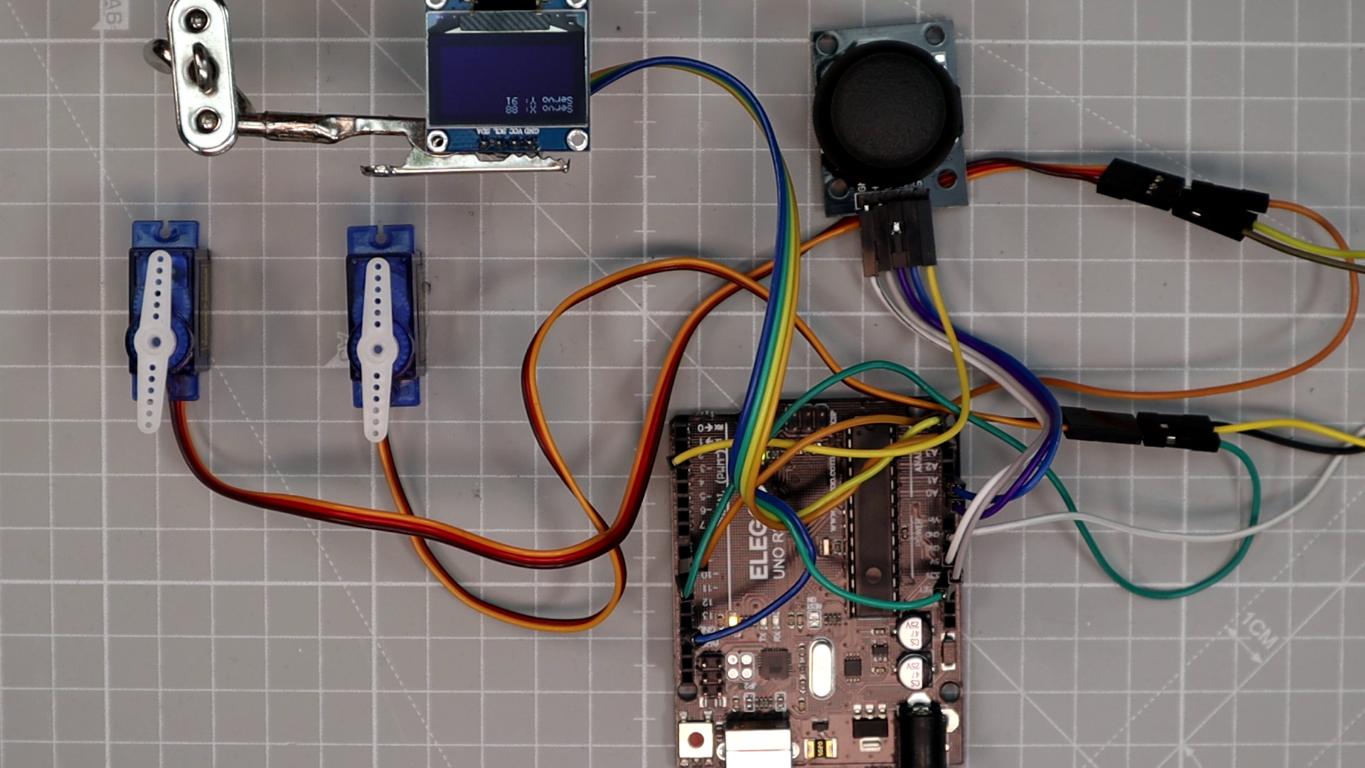
The calls analogRead(joyX) and analogRead(joyY) read the voltage on A0 and A1. Each joystick potentiometer outputs 0 V at one end of its travel and 5 V at the other. The Arduino’s ADC (analog-to-digital converter) turns this voltage into a number from 0 to 1023. At center position, you will typically read values around 500 to 520. With my joystick at rest, the OLED showed 88 degrees on X and 91 on Y, which corresponds to raw values of about 503 and 520.
Angle mapping with map()
The call map(xVal, 0, 1023, 0, 180) scales the raw joystick value (0 to 1023) linearly to a servo angle (0 to 180 degrees). A raw value of 0 gives 0 degrees, 1023 gives 180 degrees, and the center value of about 510 gives about 90 degrees. Which joystick direction gives 0 depends on how the module is mounted; Step 4 shows how to reverse it. The Y-axis uses the same mapping.
Servo output
The calls servoX.write(angleX) and servoY.write(angleY) send the calculated angle to each servo. The Servo library generates the PWM signal.
OLED display update
On every pass of loop(), display.clearDisplay() erases the previous content, display.setCursor(0,0) moves the text cursor to the top-left corner, and print() writes both angles. The call display.display() sends the image buffer to the OLED; print() only changes this buffer. The display shows the angle sent to each servo, which helps during calibration.
Why delay(50) is used
The 50 ms delay limits the loop to at most 20 updates per second. The Servo library sends its pulse every 20 ms regardless of the delay, so the delay does not change the PWM signal. It reduces how often small joystick noise reaches the servos. If the servos still jitter at rest, add the dead zone from Step 3.
How to test and calibrate the setup
Step 1: Test both axes
Move the joystick left and right: the servo on D9 turns from 0 to 180 degrees and the Servo X value on the OLED changes. Move it up and down: the servo on D10 turns and the Servo Y value changes.
Step 2: Check the center position
With the joystick at center, both values on the OLED read about 90 degrees. If the display stays blank, see the Troubleshooting section.
Step 3: Add a dead zone for center stability
If the servos jitter while the joystick rests at center, add a dead zone. After the two map() lines, add one line per axis:
if (xVal > 480 && xVal < 540) angleX = 90;
if (yVal > 480 && yVal < 540) angleY = 90;
While the joystick rests near center, both servos hold 90 degrees and ignore small analog noise. The rest values of my module, about 503 and 520, both fall inside this window.
Step 4: Reverse an axis if needed
If a servo moves opposite to the joystick, reverse the output range for that axis: change map(xVal, 0, 1023, 0, 180) to map(xVal, 0, 1023, 180, 0).
Step 5: Limit the servo angles for your mechanics
If your mechanics cannot use the full 0 to 180 degree range, change the output range. A pan-tilt mount that allows 30 to 150 degrees, for example, needs map(xVal, 0, 1023, 30, 150). The servo then does not push against the mechanical stops, which can damage the gears over time. In my build, the two servos lay loose on the table with only their horns attached, so I could use the full range.
Troubleshooting
OLED stays blank
Check that SDA is on A4 and SCL on A5, and that the Adafruit SSD1306 and Adafruit GFX libraries are installed. Then check that the I2C address in display.begin(SSD1306_SWITCHCAPVCC, 0x3C) matches your display. Most modules use 0x3C, and the 0.96-inch module in my build did too. If the display has never worked, change the address in that line to 0x3D or run an I2C scanner sketch, which lists the addresses of all connected I2C devices. If it worked before and stopped, look for a loose SDA, SCL or power wire.
Servos jitter at center position
Jitter at center has two usual causes: weak power (servos on the Arduino 5 V pin) or analog noise from the joystick. Check the power first (see the wiring notes), then add the dead zone from Step 3. A 470 µF electrolytic capacitor (rated 10 V or more) across the servo supply lines, close to the servos, smooths short voltage dips. Connect the side marked with the minus stripe to GND.
Servos move in the wrong direction
Reverse the output range for that axis, as shown in Step 4.
One servo does not respond
Check the signal wire of that servo and the pin in the code (D9 or D10). Test the servo on its own with the Sweep example (File > Examples > Servo > Sweep), which turns the servo on pin 9 back and forth, to rule out a defective servo. Check that the servo GND is connected to the common ground.
Display shows random pixels or shifted text
Check the controller chip and the size of your module. Many 1.3-inch modules use the SH1106 chip, which needs a different library, and a 128×32 module needs SCREEN_HEIGHT 32. If you changed the code, check that display.display() is still called after printing.
System resets when both servos move
The usual cause is insufficient power: two servos that start or stall at the same time draw more than a USB port supplies. Power the servos from an external 5 V supply as described in the wiring notes, and connect only its ground to the Arduino.
Joystick values feel noisy
Some joystick modules give noisy analog readings. To smooth them, read each axis several times (for example four) and use the average, or add the dead zone from Step 3. Keep the joystick wires short and away from the servo wires.
Frequently asked questions
Yes. This project works with any Arduino that has two analog inputs and two free digital pins. The Servo library creates its signal with a timer on any digital pin, so it does not need the hardware PWM pins marked with ~ on the board. Any 5 V Arduino with the same pins works without changes, for example the Nano. The Mega and Leonardo work too, but their I2C pins are not A4 and A5 (Mega: 20 and 21, Leonardo: 2 and 3), so move the SDA and SCL wires accordingly.
One joystick has two axes, so it controls two servos. The Uno has six analog inputs (A0 to A5), but A4 and A5 carry the I2C signals for the OLED, so two joysticks (four servos) fit next to the display. For more servos, use the SW button to switch the joystick between servo pairs, or add a PCA9685 driver, which controls up to 16 servos over I2C.
No. The servos follow the joystick without the display, because display.begin() does not check whether a display is connected. The OLED makes testing and calibration easier, since it shows the angle sent to each servo.
Yes, but an MG996R draws far more current: TowerPro lists a stall current of 2.5 A at 6 V. Size the external supply for the stall current of both servos. The code stays the same, because both servo types use the same control signal.
Resources and next steps
Related OmArTronics tutorials
- Arduino Servo Control Guide: SG90, PWM, and PCA9685: how hobby servos work, the PWM signal and the PCA9685 driver.
- Arduino Programming Basics: wiring, sketches and the Arduino IDE for first-time users.
- Arduino IR Remote Tutorial: Control an LED, Then Add a Servo Door: an IR remote controls an LED and a servo door.
- DIY 6-DOF Robotic Arm: 3D Print, Wire, and Program: a 3D-printed arm with six servo joints (6-DOF means six degrees of freedom).
- DIY 6-DOF Robotic Arm with Bluetooth Control: a robot arm with wireless smartphone control over Bluetooth.
- Arduino and HC-05/HC-06 Bluetooth Module Complete Tutorial: wiring and code for the HC-05 and HC-06 modules.
- Arduino Radar with HC-SR04 and Servo Motor: a servo sweeps an HC-SR04 ultrasonic sensor.
- Arduino Password Door Lock with Keypad and LCD: a keypad code opens a servo-driven lock.
Suggested next upgrades
- Use the joystick SW pin to save servo positions or switch between control modes.
- Replace the joystick with a smartphone app that talks to the Arduino over an HC-05 Bluetooth module.
- Build a two-axis camera mount and control it with this circuit.
- Add more servos and joysticks for a robot arm with more joints.
- Store servo positions in EEPROM, the Arduino’s memory that keeps data without power, and replay them as a motion sequence.