
📋 Quick Summary
Complete guide to using the L298N dual H-bridge motor driver with Arduino. Learn the pinout, wiring for one or two DC motors, direction control via digital pins, PWM speed control, and power supply options. Includes tested Arduino code for all common motor control scenarios.
The L298N motor driver is one of the most widely used modules for controlling DC motors with Arduino. Whether you are building your first robot car, an automated conveyor, or a pan-tilt camera mount, understanding how to wire and program the L298N dual H-bridge is an essential skill. Accordingly, this tutorial walks you through everything you need to know, from the basics of H-bridge motor control to wiring, Arduino code, PWM speed control, troubleshooting, and frequently asked questions. By the end of this guide you will be able to confidently control DC motor speed and direction using the L298N and Arduino.
What You Will Learn
- What the L298N motor driver is, what an H-bridge does, and why you need a motor driver in the first place.
- The full L298N pinout, including ENA, ENB, IN1 through IN4, motor outputs, and power terminals.
- Wiring the L298N to an Arduino and one or two DC motors with a proper external power supply.
- How to write Arduino code that controls motor direction with digitalWrite() and motor speed with analogWrite() using PWM.
- Testing, tuning, and troubleshooting your motor driver setup so it works reliably.
- How the L298N compares with other popular Arduino motor driver options like the Arduino Motor Shield and L293D shield.
What Is the L298N Motor Driver?
The L298N is a dual H-bridge motor driver IC mounted on a breakout board. As a result, it lets you control two DC motors independently, setting both the direction and speed of each motor from an Arduino or any other microcontroller. Furthermore, the module can handle motor supply voltages from 5 V to 35 V and deliver up to 2 A of continuous current per channel, which is enough for most small to medium hobby motors. If you are new to Arduino, our What is Arduino guide is a great place to start before diving into motor control.
Indeed, the L298N module is a popular choice for robotics projects because it is inexpensive, widely available, and beginner-friendly. It is used in countless Arduino robot cars, including our own obstacle-avoiding robot car and Bluetooth-controlled robot car projects.
How an H-Bridge Works
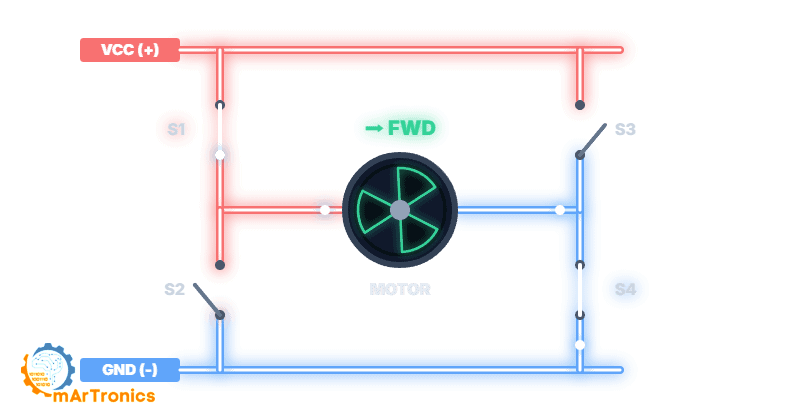
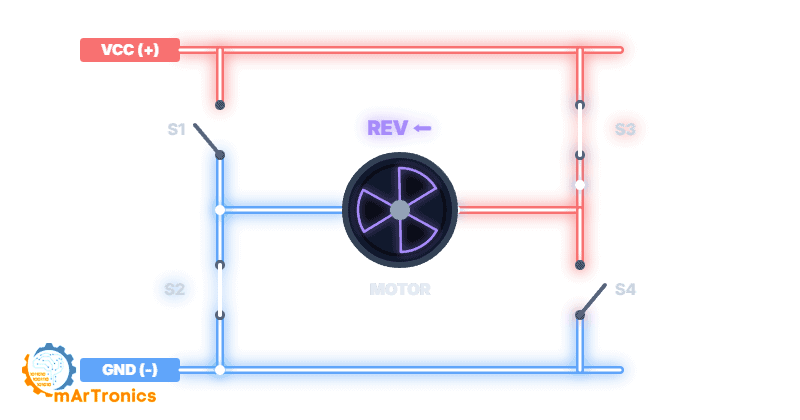
An H-bridge is a circuit made up of four switches arranged in an H-shaped pattern around a motor. By opening and closing different pairs of switches, you can consequently make current flow through the motor in either direction, which controls whether the motor spins forward or backward.
Forward Direction
Specifically, when switches S1 and S4 are closed while S2 and S3 remain open, current flows from the power supply through the motor in one direction, causing it to spin forward.
Reverse Direction
Conversely, when switches S2 and S3 are closed while S1 and S4 remain open, current flows in the opposite direction, reversing the motor.
Speed Control with PWM
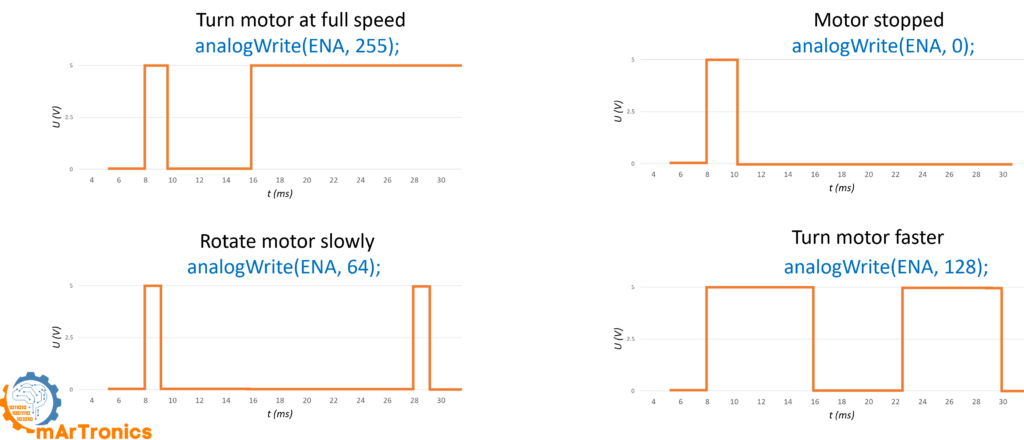
Pulse Width Modulation (PWM) is the technique used to control motor speed. Instead of supplying a constant voltage, the Arduino rapidly switches the enable pin on and off. The ratio of on-time to off-time, called the duty cycle, determines the average voltage the motor receives. For example, a 50 percent duty cycle delivers roughly half the supply voltage, resulting in a slower motor speed. In contrast, a 100 percent duty cycle delivers the full voltage for maximum speed. On the L298N module, PWM signals are applied to the ENA and ENB enable pins.
L298N Pinout Explained
The L298N breakout board has several groups of pins and terminals. Therefore, understanding each one is critical before you connect anything.
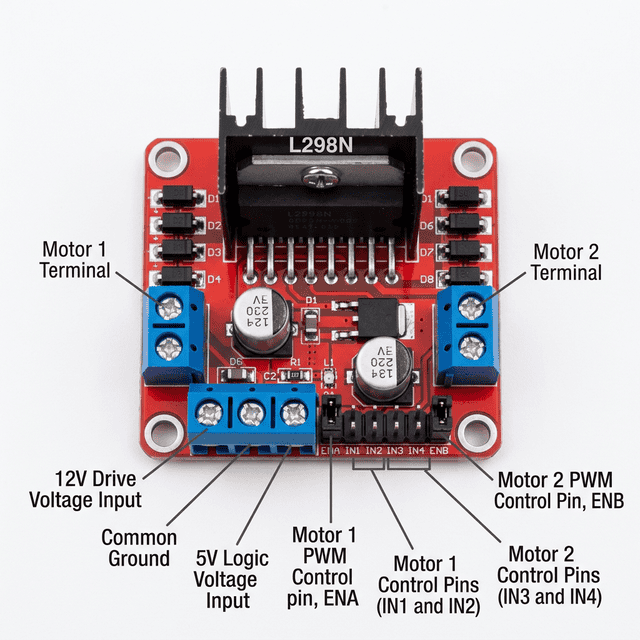
Motor output terminals (OUT1, OUT2, OUT3, OUT4): In short, these screw terminals connect directly to your DC motors. Specifically, OUT1 and OUT2 drive Motor A, while OUT3 and OUT4 drive Motor B.
Power terminals (+12V, GND, +5V): In particular, the +12V terminal accepts the external motor power supply, which can range from 5 V to 35 V depending on your motors. Meanwhile, GND is the common ground shared between the motor supply, the L298N logic, and the Arduino. The +5V terminal can either output 5 V (when the onboard voltage regulator is enabled via a jumper) or accept a 5 V logic supply (when the jumper is removed and motor voltage exceeds 12 V).
Enable and Input Pins
Enable pins (ENA, ENB): These pins control whether each motor channel is active and at what speed. In particular, when a jumper cap is installed on ENA or ENB, that motor runs at full speed whenever its direction pins are set. However, when you remove the jumper and connect ENA or ENB to an Arduino PWM pin, you gain full speed control through analogWrite().
Input pins (IN1, IN2, IN3, IN4): These four digital input pins control the direction of each motor. Specifically, IN1 and IN2 control Motor A, while IN3 and IN4 control Motor B. In other words, the logic is straightforward: setting IN1 HIGH and IN2 LOW spins Motor A forward, reversing those values spins it backward, and setting both to the same state (both LOW or both HIGH) stops the motor.
Components Needed (BOM)
Before you start wiring, gather the following components. Before you begin, if you are new to Arduino development, check our Arduino programming basics tutorial to get your IDE and board set up first.
| Component | Quantity | Notes |
|---|---|---|
| Arduino Uno (or compatible board) | 1 | Any Arduino with PWM-capable digital pins will work |
| L298N dual H-bridge motor driver module | 1 | The red breakout board with screw terminals |
| DC motor (3 V–12 V hobby motor) | 1 or 2 | TT gear motors for robot cars work well |
| External power supply for motors | 1 | Battery pack or bench supply matching your motor voltage (e.g. 4x AA batteries, 7.4 V LiPo, or 9 V–12 V adapter) |
| Jumper wires (M-F type) | ~10 | For connecting L298N pins to Arduino header pins |
| Breadboard (optional) | 1 | Helpful for organizing connections during prototyping |
| Robot chassis and wheels (optional) | 1 set | Needed if you are building a robot car project |
L298N Wiring with Arduino
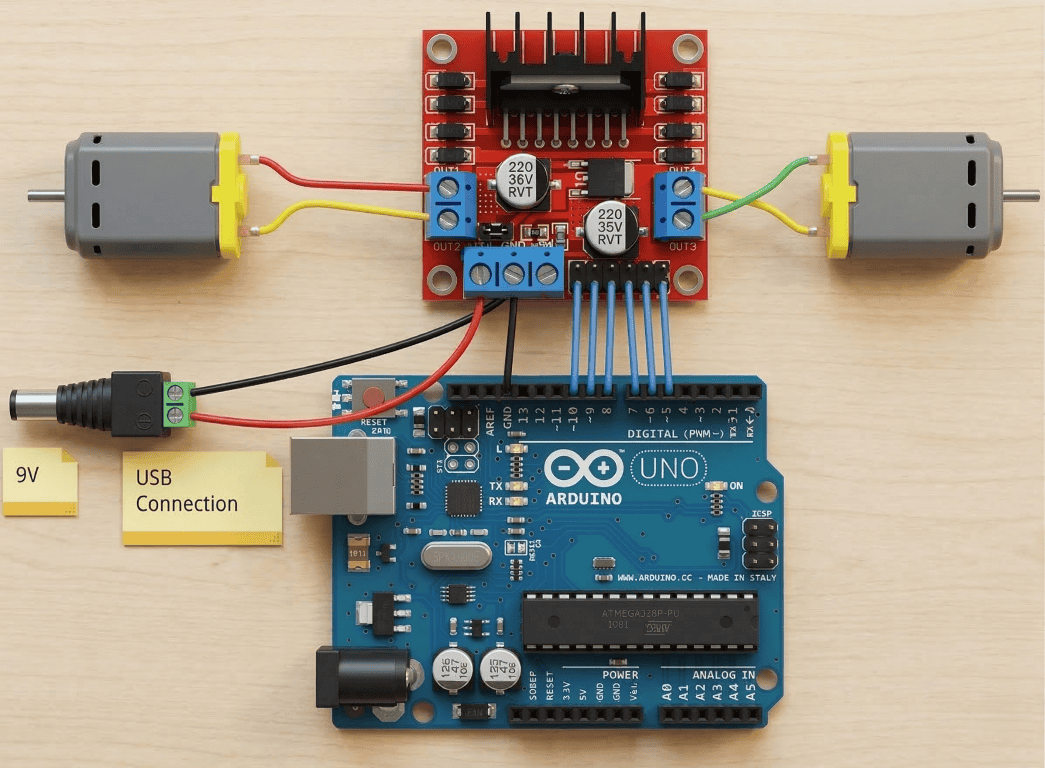
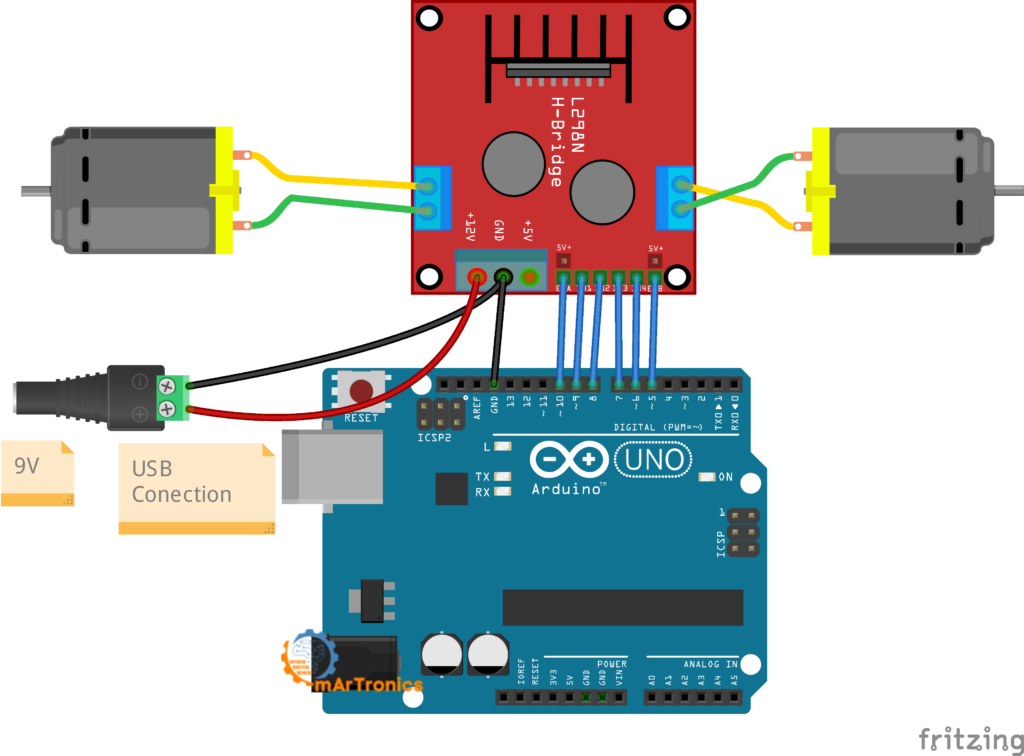
The table below shows the complete wiring between the L298N module and the Arduino Uno for controlling two DC motors with independent speed and direction.
| L298N Pin | Function | Arduino Pin | Notes |
|---|---|---|---|
| ENA | Motor A speed (PWM) | D10 (PWM) | Remove the jumper cap from ENA to enable PWM speed control |
| IN1 | Motor A direction input 1 | D9 | Set HIGH or LOW to control direction |
| IN2 | Motor A direction input 2 | D8 | Set HIGH or LOW to control direction |
| IN3 | Motor B direction input 1 | D7 | Set HIGH or LOW to control direction |
| IN4 | Motor B direction input 2 | D6 | Set HIGH or LOW to control direction |
| ENB | Motor B speed (PWM) | D5 (PWM) | Remove the jumper cap from ENB to enable PWM speed control |
| +12V (VCC) | Motor power supply positive | — | Connect to your external battery or supply positive terminal (5 V–35 V; typically 6 V–12 V for most robot projects) |
| GND | Common ground | GND | Critical: Connect the L298N GND to both the external supply ground AND the Arduino GND |
| +5V | Onboard 5 V regulator output | — | With the onboard jumper installed, this outputs 5 V. Can optionally power the Arduino, but most beginners should power the Arduino separately via USB |
Power Supply and Safety
Power mistakes are the number one cause of problems in L298N projects. Follow these guidelines to keep your setup running safely.
Always use an external power supply for motors. This is important because DC motors draw far more current than the Arduino 5V pin can safely provide. As a consequence, attempting to power motors directly from the Arduino can cause voltage drops, erratic behavior, and permanent damage to your board. Use a separate battery pack or power adapter connected to the L298N +12V terminal.
Connect a common ground. The Arduino GND, the L298N GND, and the negative terminal of your external motor power supply must all be connected together. Without a common ground, the logic signals from the Arduino will not be interpreted correctly by the L298N; consequently, your motors may behave unpredictably or not move at all.
Match your power supply to your motors. To do this, check the voltage rating on your DC motors and choose a supply that matches. For typical TT gear motors used in robot cars, a 4xAA battery pack (6 V) or a 7.4 V LiPo works well. The L298N module itself supports motor voltages from 5 V up to 35 V.
Voltage Regulator, Drop, and Noise
Understand the onboard 5V regulator. The L298N board has a built-in voltage regulator with a jumper cap. When the jumper is installed and you supply 7 V–12 V to the +12V terminal, the +5V pin on the board outputs a regulated 5 V that you can optionally use to power your Arduino (connect it to the Arduino 5V pin, not Vin). On the other hand, if your motor supply exceeds 12 V, you should remove this jumper to protect the regulator, and you will need to supply 5 V logic power to the +5V pin separately.
Expect voltage drop. Additionally, the L298N uses bipolar transistor technology, which means approximately 1.4 V to 2 V is lost as heat across the driver. For instance, if you supply 6 V, your motors actually receive around 4 V to 4.6 V. Consequently, plan your supply voltage accordingly.
Watch for motor noise. Moreover, DC motors generate electrical noise and voltage spikes, especially when they start or reverse. If your Arduino resets unexpectedly when the motor turns on, that noise is likely the cause. Make sure power connections are solid, consider adding a 100 nF ceramic capacitor across each motor terminal, and always keep the motor power supply separate from the Arduino power supply.
Arduino Code: Controlling Two DC Motors
Once your wiring is complete, you can then upload the following sketch to your Arduino. Specifically, this code demonstrates forward motion, stopping, and reverse for two DC motors at half speed. If you need a refresher on uploading sketches, see our Arduino programming basics guide.
/**
 * L298N Motor Driver - Two DC Motor Control
 * Author: Omar Draidrya
 * Website: omartronics.com
 *
 * Controls forward, stop, and reverse for two DC motors
 * using the L298N dual H-bridge with PWM speed control.
 */

#define IN1 9    // Motor A direction pin 1
#define IN2 8    // Motor A direction pin 2
#define IN3 7    // Motor B direction pin 1
#define IN4 6    // Motor B direction pin 2
#define ENA 10   // Motor A speed control (PWM)
#define ENB 5    // Motor B speed control (PWM)

void setup() {
  // Set all motor control pins as outputs
  pinMode(IN1, OUTPUT);
  pinMode(IN2, OUTPUT);
  pinMode(IN3, OUTPUT);
  pinMode(IN4, OUTPUT);
  pinMode(ENA, OUTPUT);
  pinMode(ENB, OUTPUT);

  // Start with motors stopped
  digitalWrite(IN1, LOW);
  digitalWrite(IN2, LOW);
  digitalWrite(IN3, LOW);
  digitalWrite(IN4, LOW);
}

void loop() {
  // --- Move both motors FORWARD at half speed ---
  digitalWrite(IN1, HIGH);
  digitalWrite(IN2, LOW);
  digitalWrite(IN3, HIGH);
  digitalWrite(IN4, LOW);
  analogWrite(ENA, 128);   // Motor A at ~50% speed
  analogWrite(ENB, 128);   // Motor B at ~50% speed
  delay(2000);

  // --- STOP both motors ---
  digitalWrite(IN1, LOW);
  digitalWrite(IN2, LOW);
  digitalWrite(IN3, LOW);
  digitalWrite(IN4, LOW);
  delay(2000);

  // --- Move both motors BACKWARD at half speed ---
  digitalWrite(IN1, LOW);
  digitalWrite(IN2, HIGH);
  digitalWrite(IN3, LOW);
  digitalWrite(IN4, HIGH);
  analogWrite(ENA, 128);
  analogWrite(ENB, 128);
  delay(2000);

  // --- STOP both motors ---
  digitalWrite(IN1, LOW);
  digitalWrite(IN2, LOW);
  digitalWrite(IN3, LOW);
  digitalWrite(IN4, LOW);
  delay(1000);
}
Code Walkthrough
Pin definitions (lines 10–15): Six pins are defined using #define. IN1 and IN2 control Motor A direction. IN3 and IN4 control Motor B direction. ENA and ENB control the speed of each motor through PWM. Pins 10 and 5 are used for ENA and ENB because they support PWM on the Arduino Uno.
setup() function: First, all six pins are configured as outputs using pinMode(). Then, all direction pins are set LOW to make sure both motors start in a stopped state. This is essential because some Arduino boards may leave pins in an unpredictable state after reset.
Forward motion: IN1 is set HIGH and IN2 LOW, which tells the H-bridge to drive Motor A forward. Similarly, IN3 HIGH and IN4 LOW drives Motor B forward. Next, the analogWrite(ENA, 128) call sends a PWM signal with a duty cycle of about 50 percent (128 out of 255), running the motor at roughly half speed. After that, the code waits 2 seconds.
Stop state: All four direction pins are set LOW. When both inputs of a motor channel are the same, the motor stops. Importantly, the enable pins do not need to be changed because the direction logic already prevents any current flow.
Backward motion: For the reverse pass, IN1 is set LOW and IN2 HIGH, reversing Motor A. Similarly, IN3 is LOW and IN4 HIGH, reversing Motor B. Once again, the speed is set to 128 for half speed.
Single Motor Example
If you only need to control one DC motor, use Motor A (IN1, IN2, ENA) and leave Motor B disconnected. The sketch below shows a minimal single-motor example that cycles through forward, stop, reverse, and stop at adjustable speed.
/**
 * L298N - Single DC Motor Control
 * Author: Omar Draidrya
 * Website: omartronics.com
 *
 * Drives one DC motor forward, stops, reverses, and stops.
 * Uses Motor A channel only (IN1, IN2, ENA).
 */

#define IN1  9   // Motor A direction pin 1
#define IN2  8   // Motor A direction pin 2
#define ENA  10  // Motor A speed (PWM)

void setup() {
  pinMode(IN1, OUTPUT);
  pinMode(IN2, OUTPUT);
  pinMode(ENA, OUTPUT);
  digitalWrite(IN1, LOW);
  digitalWrite(IN2, LOW);
}

void loop() {
  // Forward at 75 % speed
  digitalWrite(IN1, HIGH);
  digitalWrite(IN2, LOW);
  analogWrite(ENA, 191);
  delay(2000);

  // Stop
  digitalWrite(IN1, LOW);
  digitalWrite(IN2, LOW);
  delay(1000);

  // Reverse at 50 % speed
  digitalWrite(IN1, LOW);
  digitalWrite(IN2, HIGH);
  analogWrite(ENA, 128);
  delay(2000);

  // Stop
  digitalWrite(IN1, LOW);
  digitalWrite(IN2, LOW);
  delay(1000);
}
This sketch uses only three Arduino pins. Connect IN1 to pin 9, IN2 to pin 8, and ENA (with the jumper removed) to pin 10. The second motor channel remains unused and does not need any wiring.
Direction Logic Reference Table
| IN1 | IN2 | Motor A Behavior |
|---|---|---|
| HIGH | LOW | Spins forward |
| LOW | HIGH | Spins backward |
| LOW | LOW | Stops (coast) |
| HIGH | HIGH | Stops (brake) |
Test and Tune Your Setup
Before you build an entire robot around your motor driver, take a few minutes to test methodically. These steps will save you hours of debugging later.
Start with one motor. To begin, disconnect Motor B and test only Motor A. As a result, this makes it easier to identify wiring or code problems. Once Motor A works correctly, then connect Motor B.
Verify the direction. After that, upload the code and check whether the motor spins forward during the forward section. If it spins the wrong way, instead swap the two motor wires in the screw terminal or swap the IN1 and IN2 pin assignments in your code.
Start with low PWM values. Rather than jumping to analogWrite(ENA, 255), start at a low value like 80 or 100. In turn, this makes the motor spin slowly, which is safer during testing and easier to observe. However, note that very low PWM values (below about 50–70) may not generate enough voltage to overcome the motor’s internal friction, and the motor may stall or hum without spinning.
Speed Tuning and Observation
Experiment with speed levels. Try different analogWrite values to see how your motor responds: 64 for quarter speed, 128 for half speed, 192 for three-quarter speed, and 255 for full speed. Afterwards, record which values work best for your particular motor and application.
Listen and observe. A motor that hums but does not spin usually indicates insufficient PWM voltage or a mechanical jam. If the motor briefly twitches and then the Arduino resets, that points to a power supply issue. Meanwhile, spinning in only one direction suggests a wiring or code error on one of the direction pins.
Common Problems and Troubleshooting
Even experienced builders run into issues with motor drivers. Here are the most common problems and their solutions.
Motor does not spin at all. First, check that your external power supply is connected to the +12V and GND terminals and is turned on. Then, verify that ENA or ENB jumpers are removed and connected to a PWM pin on the Arduino. Also, make sure the analogWrite value is high enough (try 200 or 255). Double-check that the direction pins are not both HIGH or both LOW unintentionally.
Wiring and Connection Issues
Motor spins in only one direction. In most cases, this means one of the two direction pins (IN1/IN2 or IN3/IN4) is not properly connected or the pin assignment in the code is wrong. Therefore, test each direction pin individually with a simple digitalWrite HIGH or LOW and observe the result.
Motor is weak or slow. The L298N drops about 1.4 V to 2 V internally. If your power supply is only 5 V or 6 V, the motor may receive as little as 3.5 V to 4 V. Try a higher voltage supply. Also check that the PWM value in analogWrite() is set high enough.
Power and Thermal Issues
Arduino resets when motor starts. This is almost always a power problem. In essence, the motor draws a large inrush current at startup, causing the supply voltage to dip and the Arduino to reset. To fix this, make sure you are using a separate power supply for the motors and that the Arduino is powered independently through USB or its own adapter. In addition, adding a large electrolytic capacitor (100 uF to 470 uF) across the motor power supply can help stabilize the voltage. Finally, confirm that your common ground connection is solid.
Pin and Connection Errors
Wrong PWM pin. Keep in mind that not all Arduino pins support PWM. On the Arduino Uno, only pins 3, 5, 6, 9, 10, and 11 support analogWrite(). As a result, if you connect ENA or ENB to a non-PWM pin, the motor will either be fully on or fully off with no speed control. Check the PWM symbol (~) printed next to the pin numbers on your board.
Missing common ground. Similarly, if the L298N GND is not connected to the Arduino GND, the logic level signals from the Arduino will not be referenced correctly. The result, therefore, is unpredictable motor behavior. Always connect all grounds together.
Loose screw terminals. On top of that, the screw terminals on the L298N can work loose over time, especially with vibration from the motors. So if a motor works intermittently, tighten all screw terminal connections and make sure the wire ends are stripped and inserted firmly.
Power and Overheating Checks
No external power supply connected. If you forget to connect a battery or adapter to the +12V terminal, the motors have no power source. The L298N does not draw motor power from the Arduino. Always double-check that the external supply is wired and switched on.
L298N overheating. If the module gets very hot during operation, then the motors may be drawing more current than the 2 A per channel rating. In that case, reduce the load, use shorter duty cycles, or consider a more capable driver like the BTS7960. Although the onboard heat sink helps, it has limits.
L298N vs Other Arduino Motor Driver Options
The L298N is not the only way to drive DC motors from an Arduino. Two other popular options are the Arduino Motor Shield and the L293D Motor Shield. This section provides a brief comparison to help you choose the right driver. For full wiring and code tutorials on each shield, see their dedicated guides.
Arduino Motor Shield
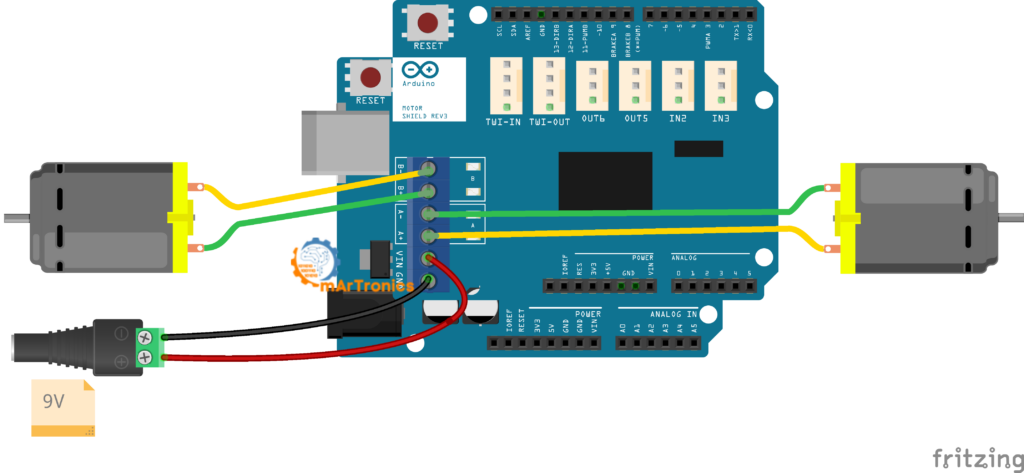
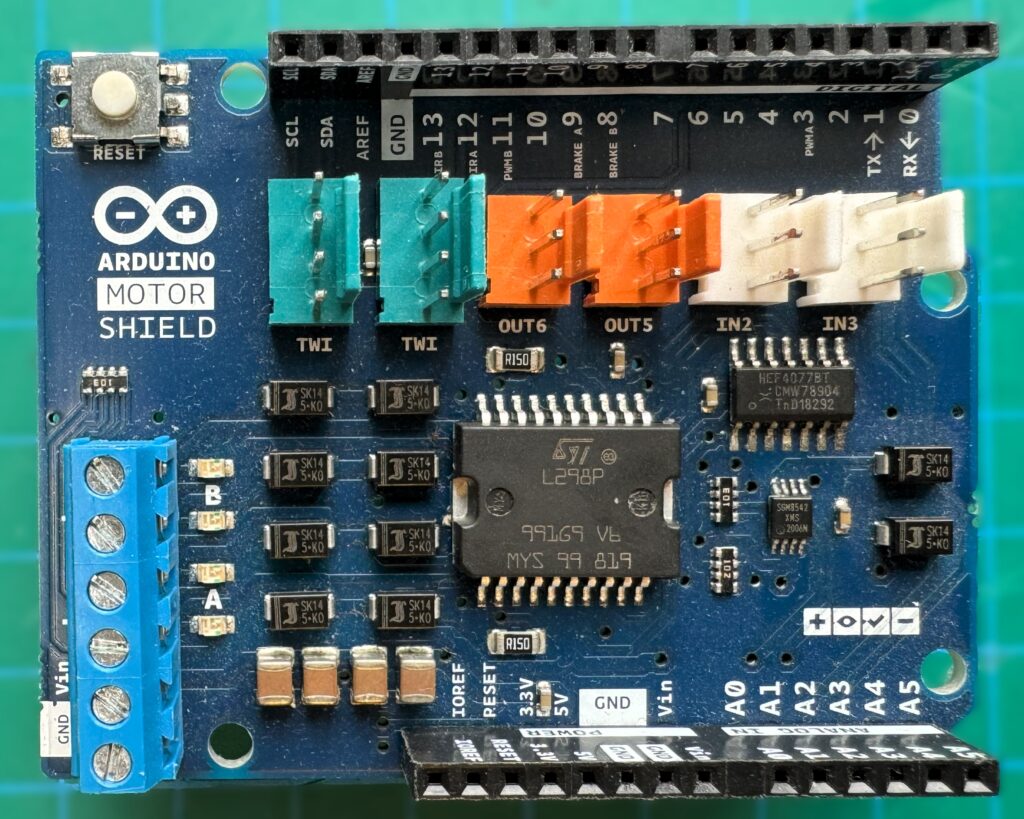
The official Arduino Motor Shield plugs directly onto the Arduino Uno headers, eliminating the need for jumper wires between the driver and the Arduino. In particular, it supports two DC motors (or one stepper motor) at up to 2 A per channel. Direction is controlled with dedicated DIR A and DIR B pins, and speed is set using PWM A and PWM B. While the shield approach is convenient for quick prototyping, it consumes specific Arduino pins and can be more expensive than a standalone L298N module. Additionally, it limits your flexibility in choosing pin assignments.
L293D Motor Shield
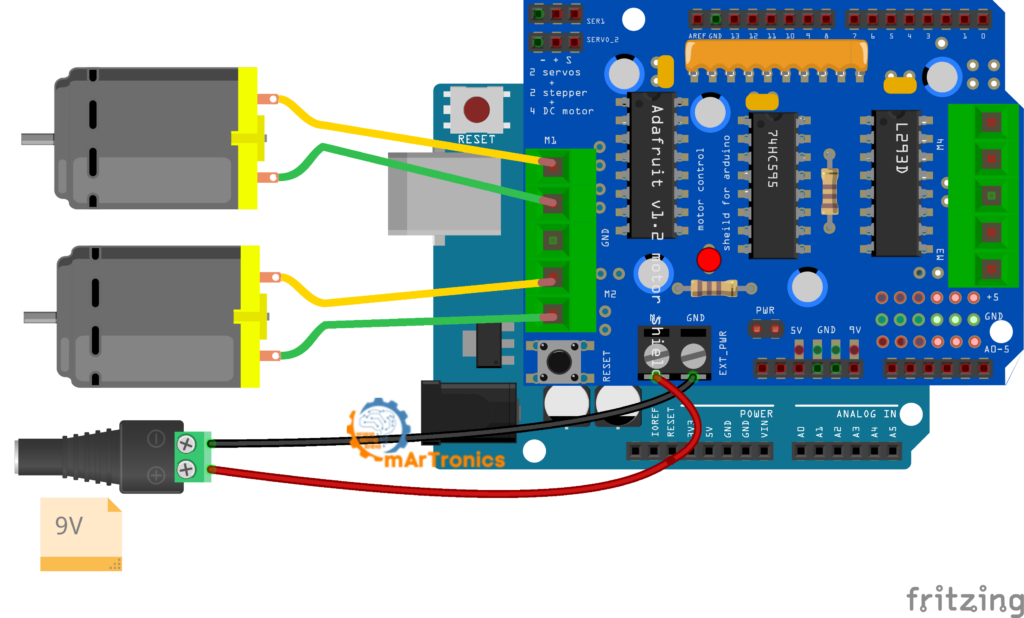
The L293D motor shield (often sold as a clone of the Adafruit Motor Shield V1) uses the L293D chip and can control up to four DC motors or two stepper motors. However, it provides only 0.6 A continuous per channel (1.2 A peak), which is less than the L298N. It is programmed using the Adafruit Motor Shield library (AFMotor.h), which simplifies the code with functions like motor.run(FORWARD) and motor.setSpeed(200). As a result, this shield is a good choice when you need to control three or four motors from a single Arduino without complex wiring. For example, we use it in our obstacle-avoiding robot car tutorial.
Quick Comparison Table
| Feature | L298N Module | Arduino Motor Shield | L293D Shield |
|---|---|---|---|
| DC motors supported | 2 | 2 | Up to 4 |
| Current per channel | 2 A continuous | 2 A continuous | 0.6 A continuous |
| Motor voltage range | 5 V – 35 V | 5 V – 12 V | 4.5 V – 25 V |
| Form factor | Standalone module with wires | Shield (plugs onto Arduino) | Shield (plugs onto Arduino) |
| PWM speed control | Yes (via ENA/ENB) | Yes (via PWM A/B) | Yes (via library) |
| Pin flexibility | High (you choose any pins) | Low (fixed pin mapping) | Low (fixed pin mapping) |
| Cost | Very low | Moderate | Low |
| Best for | Custom wiring, robot cars, learning H-bridge fundamentals | Quick prototyping with minimal wiring | Multi-motor projects needing simple code |
For most beginners building their first Arduino robot car or motor control project, the L298N standalone module offers the best combination of low cost, high current capacity, and educational value. Moreover, you learn exactly how direction and speed control work at the hardware level, which prepares you for more advanced projects.
Frequently Asked Questions (FAQ)
The L298N is a dual H-bridge motor driver used to control the speed and direction of one or two DC motors from a microcontroller like Arduino. For instance, it is commonly found in robot cars, conveyor belt controllers, and automated camera mounts.
Absolutely. Indeed, the L298N has two independent channels. In fact, you can use just one channel (Motor A with IN1, IN2, and ENA) and leave the second channel disconnected. Moreover, the unused channel does not interfere with operation.
Essentially, the L298N motor supply input (+12V terminal) supports 5 V to 35 V. However, the onboard voltage regulator works reliably only up to about 12 V. If your motor supply exceeds 12 V, remove the regulator jumper and provide 5 V logic power separately to the +5V pin.
Typically, DC motors draw a high inrush current at startup, which can cause voltage dips in the power supply. Consequently, if the Arduino shares the same supply as the motors, this dip can reset the microcontroller. Therefore, always use a separate power source for your motors and connect only the GND line between the motor supply and the Arduino.
First, remove the jumper cap from the ENA or ENB pin and connect that pin to a PWM-capable digital pin on the Arduino. Then, use the analogWrite() function with a value between 0 (stopped) and 255 (full speed) to set the motor speed. For more on PWM, see our Arduino servo and PWM control guide.
IN1 and IN2 (and IN3/IN4 for the second motor) control the direction of the motor by determining which way current flows through the H-bridge. ENA and ENB control whether the motor channel is active and at what speed. Think of the IN pins as the steering and the EN pins as the throttle.
An external power supply is required. The L298N needs one connected to its +12V and GND terminals to power the motors. The Arduino 5V pin cannot provide enough current for DC motors. Running motors from the Arduino pin risks damaging the board and causes unreliable operation.
It can. The L298N can drive a single bipolar stepper motor by using both channels together (IN1–IN4 for the four-step sequence). However, the L298N lacks microstepping capability. For smoother stepper control, a dedicated driver like the A4988 or DRV8825 is usually a better choice.
The L298N can deliver up to 2 A continuous per motor channel, with peak currents up to 3 A for short bursts. If your motors draw more than 2 A under load, you should use a more powerful driver or add active cooling to the heat sink.
A humming motor typically means the PWM duty cycle is too low to overcome the motor’s starting friction. Increase the analogWrite value. Most small DC motors need a minimum PWM value of around 50 to 80 before they start turning. Also check that the motor is not mechanically jammed and that your power supply can deliver enough current.
When the onboard regulator jumper is in place and you supply 7 V–12 V to the +12V terminal, the L298N +5V pin outputs a regulated 5 V that you can connect to the Arduino 5V pin (not Vin). This works but is not recommended for beginners because any motor noise on the supply line can reach the Arduino. For reliable results, keep the Arduino powered through USB or its own dedicated supply.
Absolutely. The L298N is one of the most popular motor drivers for Arduino robot cars. Because of this, its two independent channels are perfect for controlling the left and right motors of a differential-drive robot. In fact, many OmArTronics projects use the L298N or similar drivers, including our Bluetooth-controlled robot car and obstacle-avoiding robot car.
Resources and Next Projects
Now that you know how to control DC motors with the L298N and Arduino, here are some suggested next steps and related OmArTronics tutorials to continue your learning journey.
- Build an obstacle-avoiding robot car — combine your motor control skills with an ultrasonic sensor to create a robot that navigates around objects autonomously.
- Build a Bluetooth-controlled robot car — add an HC-05 Bluetooth module and control your robot from your smartphone.
- Arduino HC-05/HC-06 Bluetooth module tutorial — learn how to set up wireless communication between your phone and Arduino.
- Learn distance measurement with the Arduino ultrasonic distance sensor (HC-SR04) tutorial — a key skill for mobile robots.
- Arduino servo motor control guide — expand into servo motors for robotic arms, pan-tilt mechanisms, and more.
- Revisit the Arduino programming basics if you need a refresher on the Arduino IDE, sketch structure, or core functions.
- Build an Arduino radar with ultrasonic sensor and servo — a fun project that combines servo control with distance sensing.
Conclusion
In this tutorial you learned how the L298N dual H-bridge motor driver works, how to wire it to an Arduino, and how to program DC motor speed and direction control using PWM and simple digital logic. As a result, you now understand the L298N pinout, the role of each pin, the importance of a separate motor power supply and common ground, and how to troubleshoot the most common problems that beginners encounter.
Overall, the L298N is a reliable and affordable starting point for Arduino DC motor control, and the skills you practiced here transfer directly to real robotics builds. As a next step, therefore, try building one of the robot car projects linked above to put your motor control knowledge into practice. Happy building!
3 thoughts on “L298N Motor Driver with Arduino: DC Motor Control Guide”