
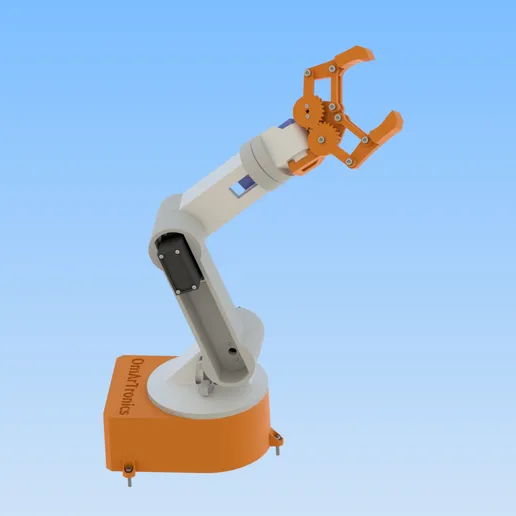
6-DOF Robotic Arm for Arduino – 3D Print Files (STL)
1,90 €
The 3D print files for a 6-DOF robotic arm. The Arduino code, wiring diagram and parts list are in the free tutorial.
Digital download, nothing is shipped. No VAT charged (small business, § 19 UStG).
Personal-use license: build and print for yourself; no sharing of the files and no selling of files or printed parts. License details
Description
6-DOF robotic arm – 3D print files
This package holds all the STL files of the 6-DOF robotic arm. The Arduino source code and the wiring diagram are in the free tutorial linked below.
The arm has 5 rotational axes and a gripper. It runs on three MG996R and three SG90 servo motors, controlled through an Arduino Mega and a PCA9685 servo driver. I designed the parts in Autodesk Inventor and made sure they print well on any FDM printer.
How it works
The Arduino Mega talks to the PCA9685 over I2C (SDA on pin 20, SCL on pin 21), which gives you 16 PWM channels for controlling servos independently. An Uno does not work here, because its I2C pins A4 and A5 are needed for the potentiometers. Base, shoulder and elbow use MG996R servos for torque; wrist and gripper use lighter SG90 micro servos. You move each joint with its own 10 kΩ potentiometer, six pots on A0 to A5. Power comes from a separate 5V supply since USB alone can’t handle the current draw from six servos at once.
Each joint has its own 3D-printed bracket and mounting system. The parts go together with M3 screws and nuts, No.2-32 and No.3-28 truss head tapping screws, three M1.6 screws and one 6806ZZ ball bearing (30x42x7 mm) in the base; the full list is in the tutorial. No glue. If something breaks, you just reprint that one piece.
Printing tips
PLA at 0.2 mm layer height, at least 40 % infill for base and arm links, 20 % for the gripper gears. Expect roughly a weekend of printing.
Who is this for?
If you’re getting started with Arduino robotics and want a hands-on project that actually does something, this is a good place to begin. The code is well commented, and the wiring diagram shows every connection. You don’t need prior experience with servo control or I2C. The tutorial walks through each step from printing to programming.
What’s included
- 12 STL files per version (two folders: with and without the centralization ring), README and LICENSE
- Arduino code, wiring diagram and parts list: in the free step-by-step tutorial (link below)
Full tutorial: DIY 6-DOF Robotic Arm: Step-by-Step Guide
Only logged in customers who have purchased this product may leave a review.
Related products
-
OmArm Zero: ROS 2 Workspace for the 6-DOF (5+1 Gripper) Arm – URDF, MoveIt 2, Computer Vision, PDF Guides & Slides (Parts 2-4)
19,00 € Add to cart -
Launch price
OmArm One: 7-DOF (6+1 Gripper) Robot Arm on Real Ball Bearings – CAD, Firmware, BOM, Build Guide & Game Controller (Parts 1 + 1.5)
19,00 €Launch price until 30 Nov 2026, then 49,00 € Add to cart -
Line-Following Robot with TCS34725 & KY-033 Sensors – 3D Print Files (STL)
Free Add to cart -
OmObi Bluetooth Robot Car: Arduino, HC-05 & Motor Shield – 3D Print Files (STL)
Free Add to cart
Reviews
There are no reviews yet.