
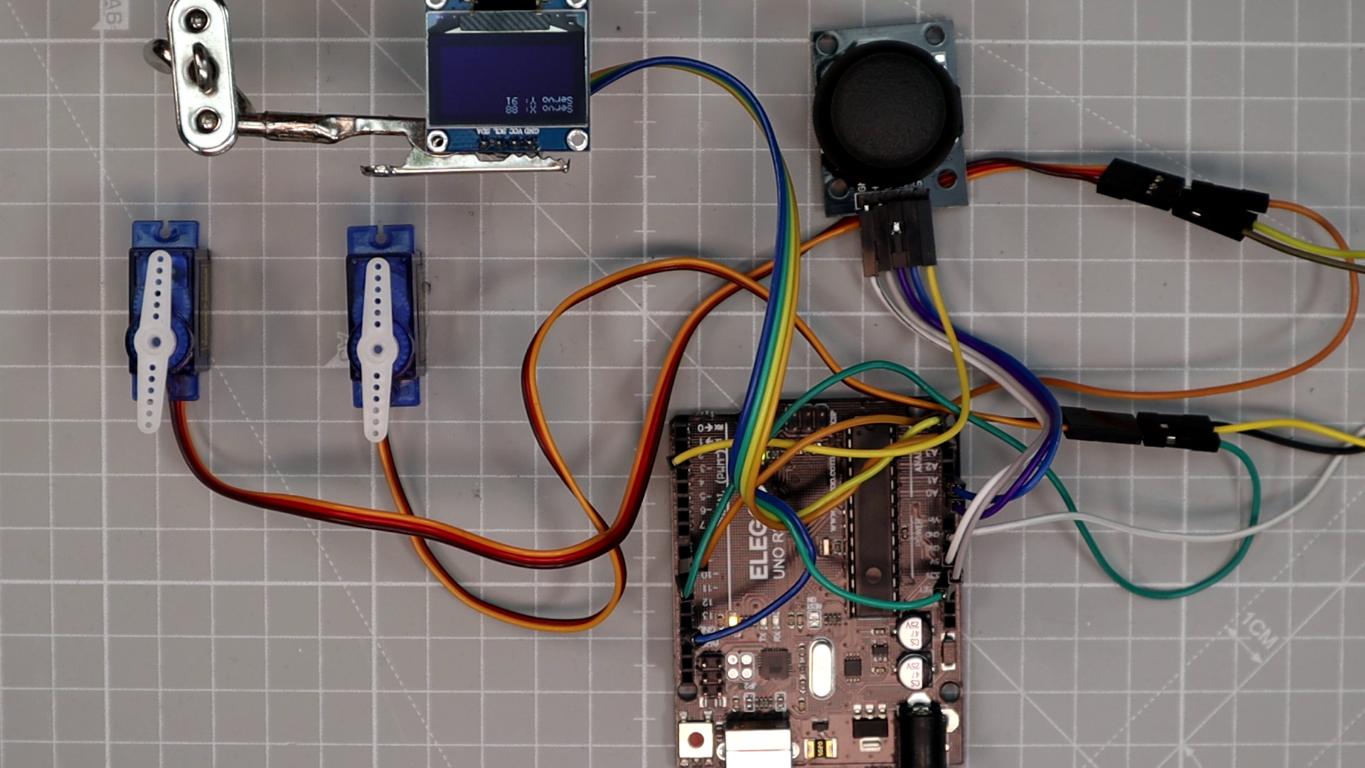
Want to control servo motors in real time using a joystick? In this hands-on Arduino joystick servo control tutorial, you will build a complete system that moves two servo motors with a joystick module while displaying live angle feedback on an SSD1306 OLED screen. This is one of the most practical beginner projects for learning analog input, servo output, and I2C display communication with Arduino.
Whether you plan to build a robot arm, a pan-tilt camera mount, or a custom remote-controlled mechanism, this servo motor with joystick Arduino project gives you the foundational wiring, code, and calibration knowledge to get started. By the end of this Arduino joystick servo tutorial, you will have a working two-axis servo controller with real-time OLED feedback.
What You Will Learn
By following this OLED joystick servo Arduino tutorial, you will learn:
- How the joystick module provides two independent analog control axes (X and Y).
- How Arduino reads joystick analog values and maps them to servo angles using the
map()function. - How to wire two SG90 servo motors and an SSD1306 OLED display to an Arduino.
- How the OLED displays live servo angle feedback in real time.
- How to wire the system safely with an external 5 V power supply and common ground.
- How to reduce servo jitter, add a dead-zone, and tune the motion for your specific application.
How the System Works
This two servo joystick control Arduino project combines four key components in a simple control loop:
- Joystick module: The joystick has two potentiometers (VRx for the X-axis, VRy for the Y-axis). Each potentiometer outputs a voltage between 0 V and 5 V. Arduino reads these as analog values from 0 to 1023.
- Arduino Uno: The Arduino reads both analog values from the joystick, converts them into servo angles (0 to 180 degrees) using the
map()function, sends the angle commands to each servo, and updates the OLED display. - Two servo motors: Each servo receives a PWM signal from a dedicated Arduino pin. One servo responds to the joystick X-axis, and the other responds to the Y-axis. This gives you independent two-axis control.
- SSD1306 OLED display: Connected via I2C (SDA and SCL), the 128×64 pixel OLED shows the current angle of each servo in real time, making it easy to verify the system is working correctly.
When you move the joystick, Arduino instantly reads the new position, calculates the corresponding servo angle, moves both servos, and refreshes the OLED. The entire loop runs roughly every 50 milliseconds, producing smooth and responsive motion. If you are new to servo motor control with Arduino, start with our dedicated guide first.
Components Needed
Here is the complete bill of materials for this SSD1306 servo joystick project. All parts are widely available and affordable.
| Component | Quantity | Purpose | Notes |
|---|---|---|---|
| Arduino Uno (or Nano) | 1 | Main microcontroller board | Any ATmega328P-based Arduino will work |
| Joystick module (XY + SW) | 1 | Two-axis analog input | Provides VRx, VRy, and optional push button |
| Servo motor (SG90 or MG90S) | 2 | Actuators for X and Y axes | Small hobby servos rated for 4.8–6 V |
| OLED display (SSD1306, I2C) | 1 | Real-time angle feedback display | 128×64 pixels, 3.3–5 V compatible |
| Breadboard + jumper wires | – | Wiring connections | Use male-to-male and male-to-female wires |
| External 5 V power supply | 1 | Stable servo power | At least 1 A recommended for two servos |
Electrical Diagram and Wiring
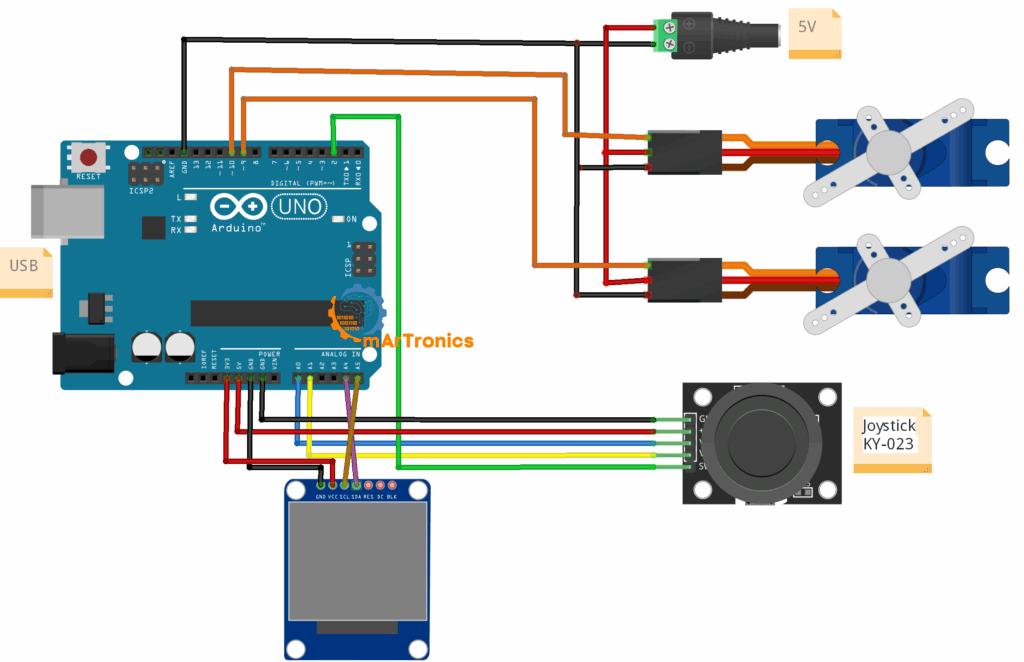
Use the wiring table below to connect all components. If you are new to Arduino programming and wiring basics, review our beginner guide first.
| Component Pin | Arduino Pin | Notes |
|---|---|---|
| Joystick VRx | A0 | X-axis analog output |
| Joystick VRy | A1 | Y-axis analog output |
| Joystick SW | D2 (optional) | Push button – not used in this sketch |
| Servo 1 Signal | D9 | PWM output for X-axis servo |
| Servo 2 Signal | D10 | PWM output for Y-axis servo |
| OLED SDA | A4 | I2C data line |
| OLED SCL | A5 | I2C clock line |
| Servo +V (both) | External 5 V | Do not power servos from the Arduino 5 V pin |
| Servo GND (both) | Common GND | Connect external supply GND to Arduino GND |
Important wiring notes:
- External 5 V power for servos: Servo motors draw significant current, especially under load. Powering them from the Arduino USB supply can cause voltage drops, servo jitter, or board resets. Always use a separate 5 V supply rated for at least 1 A.
- Common ground: The external power supply GND, the Arduino GND, and all component GND pins must be connected together. Without a common ground, signals will not be referenced correctly and the circuit will not work.
- I2C pull-ups: Most SSD1306 OLED breakout boards include built-in pull-up resistors on SDA and SCL. If your display does not have them, add 4.7 kΩ pull-ups to 3.3 V or 5 V.
Programming the Arduino
The complete Arduino sketch reads the joystick, maps the analog values to servo angles, drives both servos, and updates the OLED display in a continuous loop. Make sure you have the following libraries installed in the Arduino IDE before uploading: Servo.h (built-in), Adafruit_GFX, and Adafruit_SSD1306. You can install the Adafruit libraries from the Library Manager in the Arduino IDE.
Full Code and GitHub Repository
GitHub Repository: App and Code
#include <Servo.h>
#include <Adafruit_GFX.h>
#include <Adafruit_SSD1306.h>
// OLED setup
#define SCREEN_WIDTH 128
#define SCREEN_HEIGHT 64
Adafruit_SSD1306 display(SCREEN_WIDTH, SCREEN_HEIGHT, &Wire, -1);
// Servo setup
Servo servoX;
Servo servoY;
int joyX = A0;
int joyY = A1;
int servoXPin = 9;
int servoYPin = 10;
void setup() {
  servoX.attach(servoXPin);
  servoY.attach(servoYPin);
  // OLED init
  if(!display.begin(SSD1306_SWITCHCAPVCC, 0x3C)) {
    for(;;); // Halt if display not found
  }
  display.clearDisplay();
  display.setTextSize(1);
  display.setTextColor(SSD1306_WHITE);
}
void loop() {
  int xVal = analogRead(joyX);
  int yVal = analogRead(joyY);
  int angleX = map(xVal, 0, 1023, 0, 180);
  int angleY = map(yVal, 0, 1023, 0, 180);
  servoX.write(angleX);
  servoY.write(angleY);
  // OLED output
  display.clearDisplay();
  display.setCursor(0,0);
  display.print("Servo X: "); display.println(angleX);
  display.print("Servo Y: "); display.println(angleY);
  display.display();
  delay(50); // small debounce
}
Code Explanation
Library Includes and Setup
The sketch includes three libraries. Servo.h provides the Servo class for controlling standard hobby servos with PWM. Adafruit_GFX.h is the core graphics library that provides drawing functions (text, shapes, pixels). Adafruit_SSD1306.h is the driver for SSD1306-based OLED displays over I2C. The display is initialized at I2C address 0x3C, which is the default for most 128×64 SSD1306 modules.
Joystick Analog Reading
The analogRead(joyX) and analogRead(joyY) calls read the voltage on pins A0 and A1. The joystick potentiometers output a voltage from 0 V (one extreme) to 5 V (other extreme), and the Arduino ADC converts this to a value from 0 to 1023. At center position, you will typically read values around 500–520.
Angle Mapping with map()
The map(xVal, 0, 1023, 0, 180) function linearly scales the raw joystick value (0–1023) to a servo angle (0–180 degrees). When the joystick is pushed fully left, the servo goes to 0 degrees. Fully right goes to 180 degrees. Center position maps to approximately 90 degrees. The same mapping applies independently to the Y-axis servo.
Servo Output
The servoX.write(angleX) and servoY.write(angleY) commands send the calculated angle to each servo. The Servo library handles the PWM signal generation internally. Each servo is attached to its own pin (D9 and D10), giving independent control over both axes.
OLED Display Update
On every loop iteration, the OLED is cleared with display.clearDisplay(), the cursor is reset to the top-left corner, and the current X and Y servo angles are printed. The display.display() call pushes the buffer to the screen. This gives you real-time visual feedback of the servo positions, which is very useful during calibration and testing.
Why delay(50) Is Used
The 50-millisecond delay at the end of the loop serves as a simple debounce and rate limiter. Without it, the loop runs extremely fast, sending rapid PWM updates that can cause servo jitter and unnecessary OLED refresh flicker. Fifty milliseconds is a good starting point. If your servos still jitter, try increasing it to 80 or 100 ms.
When a Dead-Zone Is Useful
Joystick potentiometers often produce slightly fluctuating values around center position, even when not touched. This causes servos to twitch at rest. You can fix this by adding a dead-zone in code: if the joystick value is between 480 and 540, force the angle to 90 degrees instead of mapping it. This keeps the servo still when the joystick is centered.
How to Test and Calibrate
After uploading the sketch, follow these steps to verify and fine-tune your Arduino servo control with OLED system.
Step 1: Test the X-Axis Servo
Move the joystick left and right. The servo connected to pin D9 should rotate smoothly from 0 to 180 degrees. Watch the OLED to confirm that the “Servo X” value changes as you move the stick.
Step 2: Test the Y-Axis Servo
Move the joystick up and down. The servo connected to pin D10 should rotate correspondingly. Verify the “Servo Y” value on the OLED updates correctly.
Step 3: Verify OLED Output
With the joystick at center, both servo values should read approximately 90 degrees on the OLED. If the display stays blank, double-check your SDA/SCL wiring and I2C address (most modules use 0x3C, but some use 0x3D).
Step 4: Add a Dead-Zone for Center Stability
If the servos twitch slightly when the joystick is at rest, add a dead-zone. Before calling map(), check whether the raw joystick value is between approximately 480 and 540. If so, set the angle to 90 degrees directly. This eliminates jitter from small analog noise at center position.
Step 5: Invert Axis Mapping if Needed
If the servo moves in the opposite direction from what you expect, swap the mapping range. For example, change map(xVal, 0, 1023, 0, 180) to map(xVal, 0, 1023, 180, 0). This reverses the servo direction for that axis.
Step 6: Limit Servo Angles for Mechanical Constraints
If your mechanical setup cannot handle the full 0–180 degree range (for example, a pan-tilt mount that only allows 30–150 degrees), change the output range in the map() call. For example: map(xVal, 0, 1023, 30, 150). This prevents the servo from pushing against physical stops, which can damage gears over time.
Troubleshooting
Here are the most common issues and solutions when building an Arduino joystick servo control system.
OLED Stays Blank
Check that SDA is connected to A4 and SCL to A5. Verify the I2C address in the code matches your display (usually 0x3C). Make sure the Adafruit SSD1306 and Adafruit GFX libraries are installed. If the display worked before and stopped, try a different I2C address (0x3D).
Servos Jitter at Center Position
This is the most common issue. It is almost always caused by powering servos from the Arduino 5 V pin. Use an external 5 V power supply rated for at least 1 A. Also consider adding a dead-zone in the code around the joystick center values.
Servos Move in the Wrong Direction
Swap the output range in your map() function. Change map(xVal, 0, 1023, 0, 180) to map(xVal, 0, 1023, 180, 0) for the affected axis.
One Servo Does Not Respond
Check the signal wire connection for that servo. Ensure the correct Arduino pin is used (D9 or D10). Test the servo independently with a simple sweep sketch to confirm it is not defective. Also verify the servo GND is connected to the common ground.
Display Initializes but Shows Nothing Useful
If the screen lights up but shows garbled characters, ensure display.clearDisplay() is called at the start of each loop. Also verify that display.setTextSize(1) and display.setTextColor(SSD1306_WHITE) are in the setup() function. A missing display.display() call will result in nothing appearing on screen.
System Resets When Both Servos Move
This is a clear sign of insufficient power. Two servos moving simultaneously draw significant current (up to 1 A or more under load). The Arduino USB port cannot supply this much. Use a dedicated 5 V power supply for the servos, and only share the ground with Arduino.
Joystick Values Feel Noisy
Some joystick modules produce slightly noisy analog readings. You can smooth the values by averaging multiple readings, or apply a simple software filter. A dead-zone at center position will also help. Keep the joystick wires short and away from motor wires to reduce electrical noise.
Frequently Asked Questions (FAQ)
Can I use a different Arduino board for this joystick servo project?
Yes. This project works with any Arduino that has at least two analog inputs and two PWM-capable digital outputs. Arduino Nano, Mega, and Leonardo are all compatible. If you use an Arduino board with different I2C pins, update the SDA/SCL connections accordingly.
What is the maximum number of servos I can control with a joystick?
A standard two-axis joystick controls up to two servos (one per axis). To control more servos, you can add more joysticks, use the push-button for mode switching, or use a PCA9685 servo driver with additional input methods.
Do I need an OLED display for this project to work?
No. The OLED is optional and provides visual feedback. The joystick and servos will work without the display. However, the OLED makes testing and calibration much easier because you can see the live servo angles.
Why do my servos jitter even with an external power supply?
Jitter with an external supply usually comes from noisy analog readings or missing dead-zone logic. Add a dead-zone around center values (approximately 480–540) to prevent small fluctuations from moving the servos. You can also add a capacitor (100 µF or larger) across the servo power lines to smooth voltage fluctuations.
Can I use MG996R servos instead of SG90?
Yes, but MG996R servos draw much more current (up to 2.5 A under stall). You will need a more powerful external supply. The code remains the same because both servo types accept standard PWM signals.
How do I change the servo angle range?
Modify the output range in the map() function. For example, map(xVal, 0, 1023, 30, 150) limits the servo to the 30–150 degree range instead of the full 0–180 degrees.
What I2C address does the SSD1306 OLED use?
Most 128×64 SSD1306 modules use I2C address 0x3C. Some modules use 0x3D. If your display does not initialize, try both addresses. You can also run an I2C scanner sketch to detect connected devices.
Can I add Bluetooth control to this project?
Absolutely. You can replace the physical joystick with Bluetooth input from a smartphone app using an HC-05 Bluetooth module. Our Bluetooth tutorial covers the full setup.
How do I make the joystick button do something?
The joystick SW pin outputs LOW when pressed. Connect it to a digital pin (for example D2) with an internal pull-up resistor enabled (pinMode(2, INPUT_PULLUP)). You can then use it to toggle modes, save positions, or reset the servos to center.
Can I use this setup for a robotic arm?
Yes, this is a great starting point. A two-axis joystick can control two joints of a robotic arm. For a full 6-DOF arm, you would add more joysticks or use a potentiometer-based control system. Our complete robotic arm tutorial shows how to scale this concept to a full build.
Why does the OLED flicker when the servos move?
Flickering is usually caused by voltage drops when servos draw current. Make sure the servos are on a separate power supply and not sharing the 5 V line with the OLED. Adding a decoupling capacitor near the OLED power pins can also help stabilize the display.
Resources and Next Projects
Project Code
Download the full sketch from the GitHub repository.
Related OmArTronics Tutorials
- Arduino Servo Control Guide: SG90, PWM, and PCA9685 – Learn servo fundamentals in depth.
- Arduino Programming Basics – Essential guide if you are new to Arduino code.
- Arduino IR Remote Tutorial: Control an LED, Then Add a Servo Door – Another servo-based project with IR input.
- DIY 6-DOF Robotic Arm – 3D Print, Wire, and Program – Scale up from two servos to six joints.
- DIY 6-DOF Robotic Arm with Bluetooth Control – Add wireless smartphone control to a full arm.
- Arduino and HC-05/HC-06 Bluetooth Module Complete Tutorial – Add Bluetooth to any Arduino project.
- Arduino Radar with HC-SR04 and Servo Motor – Another servo-based scanning project.
- Arduino Password Door Lock with Keypad and LCD – Servo-actuated door lock project.
Suggested Next Upgrades
- Add the joystick button: Use the SW pin to save servo positions or toggle between control modes.
- Add Bluetooth control: Replace the physical joystick with a smartphone app via HC-05 for wireless servo control.
- Build a pan-tilt mount: 3D-print or build a two-axis camera mount and control it with this exact circuit.
- Expand to a robot arm: Add more servos and joysticks to build a multi-DOF robotic arm.
- Add position saving: Store servo positions in EEPROM and replay them for automated motion sequences.
Conclusion
You have built a complete Arduino joystick servo control system with real-time OLED feedback. In this tutorial, you learned how the joystick provides two analog axes, how Arduino maps those values to servo angles, how to wire servos safely with external power, and how the SSD1306 OLED displays live position data.
This two servo joystick control Arduino project is an excellent foundation for more advanced builds. You can extend it into a robot arm, a pan-tilt camera mount, or a drawing machine. Try the suggested upgrades above, and share your results in the comments below!