
📋 Quick Summary
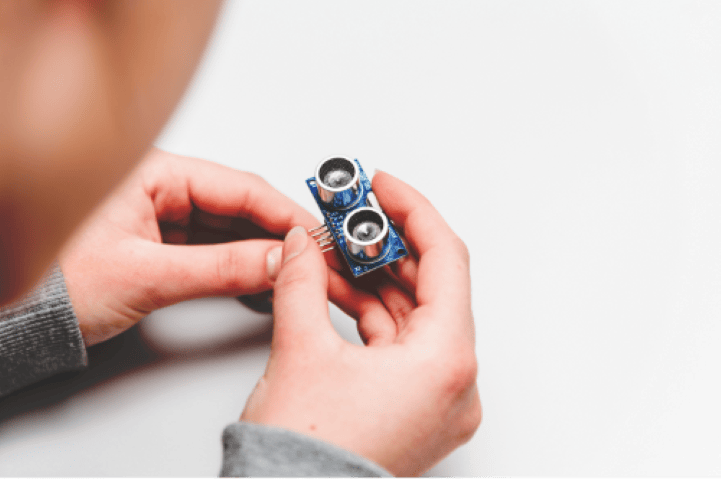
Learn how the HC-SR04 ultrasonic distance sensor works and how to connect it to Arduino. This tutorial explains the trigger-echo measurement principle, provides wiring diagrams, complete Arduino code using both pulseIn() and the NewPing library, and shows how to display distance readings on the Serial Monitor. Range: 2 cm to 400 cm.
The HC-SR04 is one of the most popular and affordable sensors in the Arduino ecosystem. It lets you measure distance without physical contact, using ultrasonic sound waves, and hundreds of robotics, automation, and measurement projects around the world rely on it. In this Arduino ultrasonic distance sensor tutorial, you will learn specifically how the HC-SR04 works, how to wire it to an Arduino, how to write and understand the code, and how to display distance readings on both the Serial Monitor and an optional I2C LCD screen. Whether you are building your first sensor project or preparing for a more advanced build like an obstacle-avoiding robot or an ultrasonic radar, this guide will give you a solid, practical foundation.
What You Will Learn
By the end of this HC-SR04 Arduino tutorial, you will be able to:
- Understand how ultrasonic distance sensing works, including the time-of-flight principle and the distance formula.
- Wire the HC-SR04 sensor correctly to an Arduino Uno using a breadboard and jumper wires.
- Write and upload Arduino code that reads distance and outputs it to the Serial Monitor.
- Optionally connect an I2C LCD display to show real-time distance measurements without a computer.
- Troubleshoot common problems like incorrect readings, zero values, and wiring mistakes.
- Understand the limitations of ultrasonic sensing and how to get the most accurate results.
How Ultrasonic Distance Sensing Works
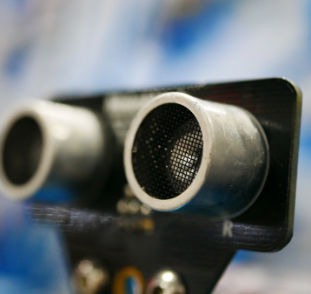
An ultrasonic sensor measures distance by sending a short burst of high-frequency sound and then listening for the echo that bounces back from an object. Bats use this same principle to navigate in the dark, and scientists call it echolocation. More specifically, the HC-SR04 module contains two cylindrical transducers on its front face: one is the transmitter (marked T) and the other is the receiver (marked R).
The Time-of-Flight Principle
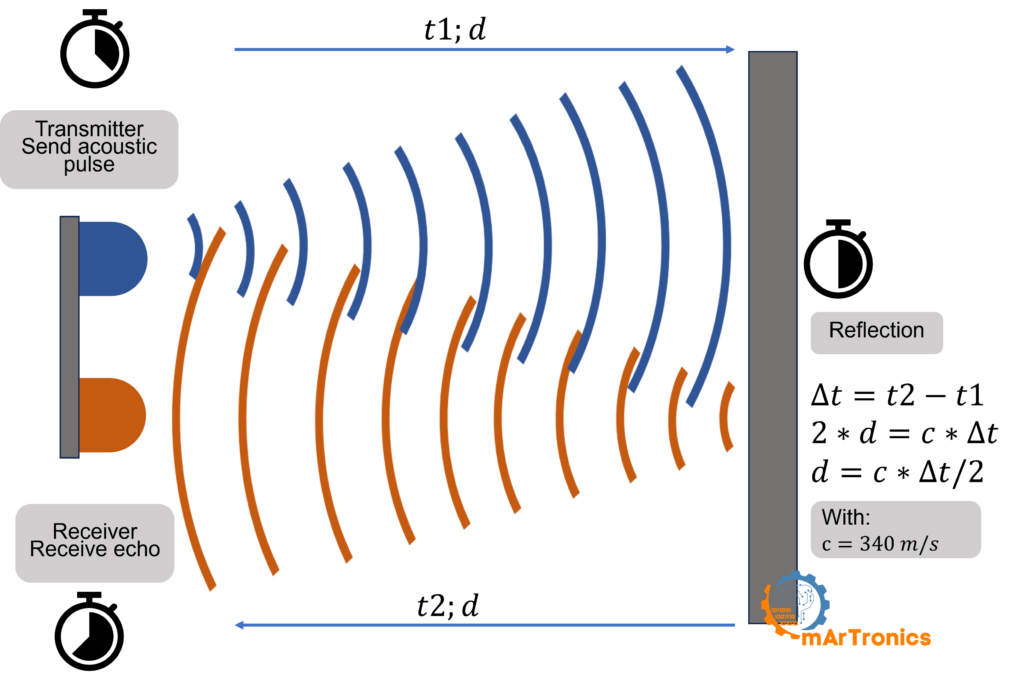
When you trigger the sensor, the transmitter emits a burst of ultrasonic pulses at approximately 40 kHz, well above the range of human hearing. As a result, these sound waves travel outward in a cone-shaped pattern. When the waves hit a solid object, they reflect back toward the sensor, where the receiver detects them as an echo. Consequently, the sensor measures the total time between sending the pulse and receiving the echo. Engineers call this the time of flight.
The Distance Formula
Because the sound pulse travels to the object and then back to the sensor, it effectively covers the distance twice. To calculate the one-way distance, you use this formula:
Distance = (Time x Speed of Sound) / 2
The speed of sound in air at room temperature (around 20 degrees C) is approximately 343 meters per second, or 0.0343 cm per microsecond. Since the Arduino measures the echo time in microseconds, the practical formula used in code is:
Distance (cm) = duration (us) x 0.0343 / 2
Therefore, the division by 2 is essential because the sound wave makes a round trip. Without it, you would get double the actual distance. Additionally, keep in mind that the speed of sound varies slightly with temperature and humidity, so readings may shift a few millimeters in extreme conditions.
Interactive Animation: How Ultrasonic Sensing Works
Click Send Ping and drag the Obstacle Distance slider to see how the HC-SR04 measures distance in real time.
HC-SR04 Specifications
Before you start wiring, however, it helps to know the key technical details of the HC-SR04 ultrasonic distance sensor. The table below summarizes the most important specifications.
| Parameter | Value |
|---|---|
| Operating Voltage | 5 V DC |
| Operating Current | 15 mA |
| Measuring Range | 2 cm to 400 cm |
| Measuring Angle | Approximately 15 degrees |
| Ultrasonic Frequency | 40 kHz |
| Trigger Pulse Width | 10 us minimum |
| Accuracy | Approximately +/-3 mm |
| Interface Pins | VCC, Trig, Echo, GND |
Components Needed
To follow this Arduino distance sensor tutorial, first gather the parts listed below. The LCD and its adapter are optional and only needed for the display upgrade section later in this guide.
| Component | Purpose | Required? | Notes |
|---|---|---|---|
| Arduino Uno | Microcontroller board that runs the code and reads sensor data | Yes | Any Arduino-compatible board works. Learn more about Arduino |
| HC-SR04 Ultrasonic Sensor | Measures distance using ultrasonic sound waves | Yes | Four-pin module: VCC, Trig, Echo, GND |
| Breadboard | Provides a solderless platform for making connections | Yes | A half-size breadboard is sufficient |
| Jumper Wires (Male-to-Male) | Connects the sensor to the Arduino through the breadboard | Yes | At least 4 wires needed |
| USB Cable (Type A to B) | Connects the Arduino to your computer for uploading code and serial output | Yes | Included with most Arduino kits |
| HD44780 16×2 LCD with I2C Adapter | Displays distance readings without needing a computer | Optional | Only needed for the LCD upgrade section |
Wiring the HC-SR04 to Arduino
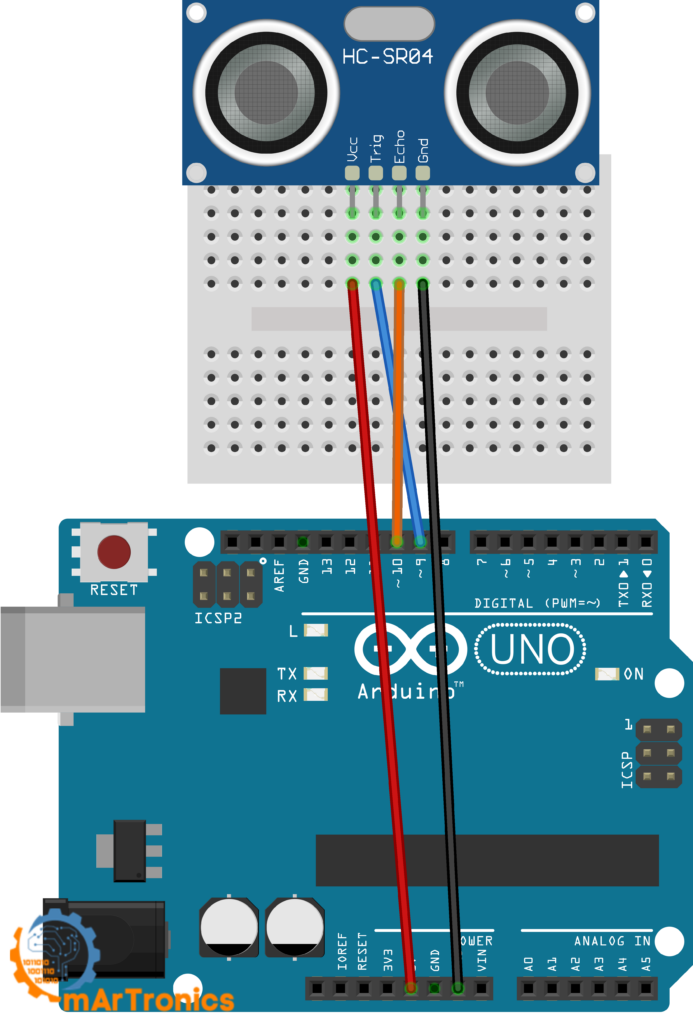
Connecting the HC-SR04 to an Arduino is straightforward. In particular, the sensor has four pins, and each one connects directly to the Arduino. Use the wiring table below and make sure all connections are secure on your breadboard before uploading any code.
| HC-SR04 Pin | Arduino Pin | Description |
|---|---|---|
| VCC | 5V | Powers the sensor (must be 5 V) |
| Trig | Digital Pin 9 | Receives the trigger signal from the Arduino |
| Echo | Digital Pin 10 | Sends the echo pulse back to the Arduino |
| GND | GND | Common ground (must be shared with Arduino GND) |
Important: Both the Arduino and the HC-SR04 must share a common ground connection. If you forget to connect GND, the sensor will not produce any readings. As a result, always double-check this connection if you get 0 cm or no output at all.
Arduino Ultrasonic Sensor Code
Once the wiring is complete, upload the following sketch to your Arduino. This code triggers the HC-SR04, reads the echo time, calculates the distance in centimeters, and prints the result to the Serial Monitor. If you are new to writing Arduino code, our Arduino programming basics guide covers the IDE setup and sketch structure in detail.
/**
 * Author: Omar Draidrya
 * Date: 2024/05/07
 * This code measures distance using an ultrasonic sensor
 * and outputs the result via serial communication.
 */

#define TRIG_PIN  9   // Trigger pin of the ultrasonic sensor
#define ECHO_PIN  10  // Echo pin of the ultrasonic sensor

void setup() {
  pinMode(TRIG_PIN, OUTPUT);
  pinMode(ECHO_PIN, INPUT);
  Serial.begin(9600);
}

void loop() {
  long duration, distance;

  digitalWrite(TRIG_PIN, LOW);
  delayMicroseconds(2);

  digitalWrite(TRIG_PIN, HIGH);
  delayMicroseconds(10);
  digitalWrite(TRIG_PIN, LOW);

  duration = pulseIn(ECHO_PIN, HIGH);

  distance = duration * 0.034 / 2;

  Serial.print("Distance (cm): ");
  Serial.println(distance);

  delay(1000);
}
Code Explanation: Line by Line
Understanding each part of the code is important because it helps you modify it later or debug issues. Here is what every section does.
#define TRIG_PIN 9 and ECHO_PIN 10 essentially assign human-readable names to the digital pin numbers. Pin 9 controls the trigger, and pin 10 listens for the echo. You can change these to any available digital pins, as long as you also update the wiring.
pinMode(TRIG_PIN, OUTPUT) configures pin 9 as an output because the Arduino needs to send a signal to the sensor to start a measurement.
pinMode(ECHO_PIN, INPUT) configures pin 10 as an input because the Arduino needs to receive the echo signal from the sensor.
Serial.begin(9600) starts serial communication at 9600 baud so the Arduino can send distance readings to your computer. Open the Serial Monitor in the Arduino IDE (Tools then Serial Monitor) to see the output.
The trigger sequence: In this sequence, the Arduino pulls the trigger pin LOW, waits 2 microseconds to ensure a clean start, then pulls it HIGH for exactly 10 microseconds, and pulls it LOW again. This 10 microsecond HIGH pulse tells the HC-SR04 to send its ultrasonic burst.
pulseIn(ECHO_PIN, HIGH) is a built-in Arduino function that waits for the echo pin to go HIGH and then measures how long it stays HIGH, in microseconds. That duration represents the total time for the sound to travel to the object and back. If the sensor does not detect an echo within the default timeout (about 1 second), pulseIn returns 0.
distance = duration * 0.034 / 2 converts the echo time into a distance in centimeters. The value 0.034 comes from the speed of sound (343 m/s converted to cm per microsecond). The division by 2 accounts for the round trip of the sound wave.
Serial.println(distance) prints the calculated distance followed by a new line, so each reading appears on its own row in the Serial Monitor.
delay(1000) pauses for one second before the next measurement cycle. You can reduce this for faster updates, but keep at least 30 ms between readings to let the sensor settle and avoid echo interference.
Testing with the Serial Monitor
After uploading the sketch, next open the Serial Monitor in the Arduino IDE by pressing Ctrl+Shift+M or going to Tools then Serial Monitor. Make sure you set the baud rate in the bottom-right corner to 9600. Then, point the sensor at a flat object like a wall or a book and slowly move it closer or farther away. You should see the distance value update every second. If the reading shows 0 or jumps wildly, instead check the wiring section and the troubleshooting section below.
Optional Upgrade: Display Distance on an I2C LCD
Once you have the basic ultrasonic sensor working and verified through the Serial Monitor, you can add an HD44780 16×2 LCD display with an I2C serial adapter. As a result, your Arduino can show distance readings on a physical screen, making the project portable and independent of a computer. Importantly, this section is optional and builds on the same wiring from the previous section.
LCD Wiring Table
First, keep the HC-SR04 connected exactly as described above (Trig on pin 9, Echo on pin 10, VCC to 5 V, GND to GND). Then add the LCD connections below.
| I2C LCD Pin | Arduino Pin | Description |
|---|---|---|
| VCC | 5V | Powers the LCD module |
| GND | GND | Common ground |
| SDA | A4 | I2C data line |
| SCL | A5 | I2C clock line |
Note on I2C addresses: Most I2C LCD modules use the default address 0x27. Some modules use 0x3F instead. If your LCD does not display anything after uploading the code, try changing the address in the code or run an I2C scanner sketch to detect the correct address.
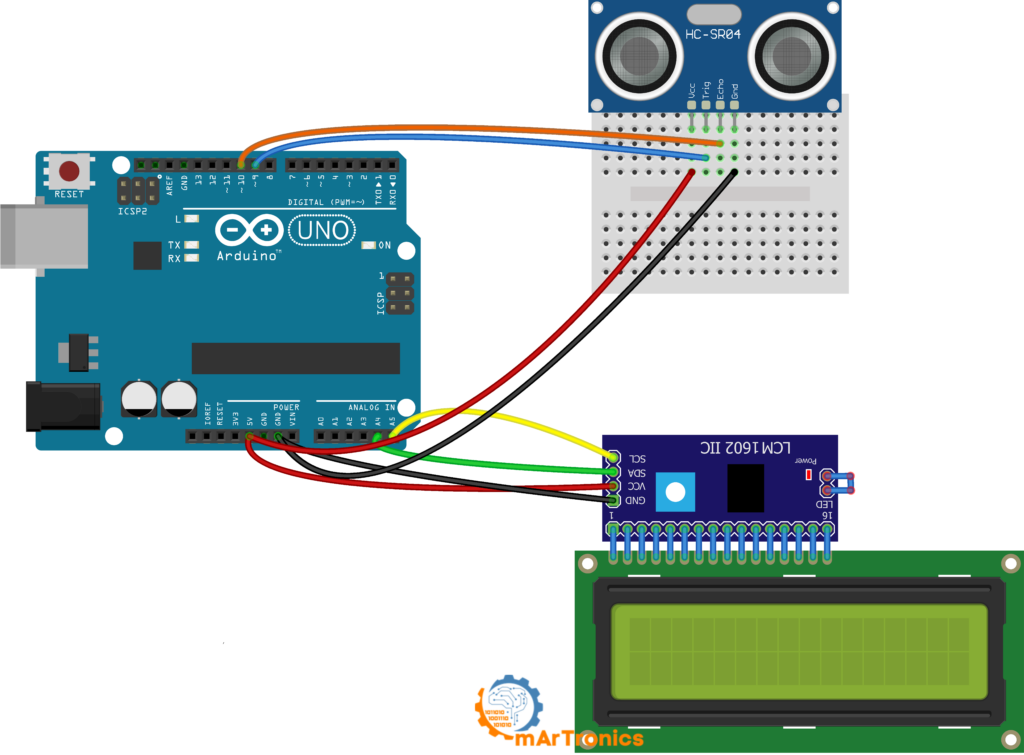
LCD Arduino Code with NewPing Library
The following sketch uses two libraries: NewPing for simplified ultrasonic sensor readings and LiquidCrystal_I2C for controlling the LCD over the I2C bus. You need to install both libraries through the Arduino Library Manager (Sketch then Include Library then Manage Libraries) before uploading. In other words, the NewPing library handles the trigger and echo timing internally, which means you do not need to write the low-level pulse code yourself. It also provides built-in noise filtering and timeout management.
/**
 * Author: Omar Draidrya
 * Date: 2024/05/07
 * This code measures distance using an ultrasonic sensor
 * and displays the result on an LCD.
 */

#include <LiquidCrystal_I2C.h>
#include <NewPing.h>

#define TRIGGER_PIN  9
#define ECHO_PIN     10
#define MAX_DISTANCE 200

LiquidCrystal_I2C lcd(0x27, 16, 2);
NewPing sonar(TRIGGER_PIN, ECHO_PIN, MAX_DISTANCE);

void setup() {
  lcd.init();
  lcd.backlight();
  lcd.clear();
  lcd.setCursor(0, 0);
  lcd.print("Distance:");
}

void loop() {
  delay(50);
  int distance = sonar.ping_cm();

  lcd.setCursor(0, 1);
  if (distance > 0) {
    lcd.print(distance);
    lcd.print(" cm    ");
  } else {
    lcd.print("Out of range    ");
  }
}
Overall, this setup provides a clear and portable distance readout. Furthermore, the I2C adapter reduces the number of wires significantly compared to connecting a standard LCD in parallel mode, and it frees up digital pins for other sensors or actuators. If you enjoyed this section, you might also like our Arduino password door lock project, which also uses an I2C LCD.
Accuracy, Limitations, and Best Practices
The HC-SR04 is a reliable sensor for most hobby and educational projects, but it has physical limitations that every user should understand. However, being aware of these will help you design better projects and avoid confusing readings.
Minimum range (blind zone): The HC-SR04 cannot accurately measure objects closer than about 2 cm. In this range, the transmitted pulse and the returning echo overlap, making it impossible for the receiver to distinguish them.
Soft and angled surfaces: Ultrasonic waves reflect best off hard, flat surfaces positioned perpendicular to the sensor. For example, soft materials like fabric, foam, or fur absorb much of the sound energy. Similarly, curved or angled surfaces can deflect the echo away from the receiver entirely.
Narrow detection cone: The HC-SR04 has an effective measuring angle of roughly 15 degrees. The sensor will not detect objects outside this cone. This is important when mounting the sensor on a robot or a fixed installation.
Environmental factors: The speed of sound varies with air temperature and humidity. At 0 degrees C, sound travels at about 331 m/s, while at 30 degrees C it reaches about 349 m/s. For most indoor projects at room temperature, however, the standard value of 343 m/s is close enough.
Noisy or jumping readings: Stray echoes, nearby objects, or electrical noise often cause occasional spikes or dips in readings. As a result, a practical solution is to take multiple readings and average them.
Mounting height and alignment: Mount the sensor so that its transducers face the target area directly. For instance, tilting the sensor even slightly can cause echoes to miss the receiver. On mobile robots, ensure you mount the sensor rigidly and does not vibrate during movement.
Troubleshooting Common HC-SR04 Problems
If your ultrasonic sensor is not working as expected, first work through these common issues before assuming the sensor is faulty.
Always reading 0 cm: This usually means the echo pin is not receiving a signal. Check that you connected the echo wire to the correct pin (pin 10 in this tutorial). Also verify that you connected the GND of the sensor to the Arduino GND.
Always reading maximum distance: If the sensor consistently returns its maximum value, the echo may be getting lost. For example, this can happen when the sensor faces an open space with no object in range, or when the target surface absorbs or deflects the sound.
Random jumping values: In most cases, unstable readings result from loose wiring, breadboard contact issues, or interference from other ultrasonic sources. Therefore, press all wires firmly into the breadboard. If readings still jump, alternatively add a small delay between measurements or average multiple readings.
Code and Configuration Issues
No serial output at all: First, make sure you selected the correct board and port in the Arduino IDE under Tools. Also check that the Serial Monitor baud rate matches the value in your code (9600).
Wrong pin assignment in code: If you wired Trig and Echo to pins other than 9 and 10, update the #define lines at the top of the sketch to match your actual wiring.
Insufficient power or loose wiring: The HC-SR04 needs a stable 5 V supply. If you are powering many components from the Arduino 5V pin, the voltage may drop below what the sensor needs.
LCD not showing text: If the screen stays blank after completing the LCD section, then check the I2C address first. Try 0x3F instead of 0x27 in the code. Also check that you connected SDA to A4 and SCL to A5. Adjust the contrast potentiometer on the back of the I2C adapter.
Frequently Asked Questions (FAQ)
The HC-SR04 can measure distances up to approximately 400 cm (4 meters). However, in practice, readings above 200 to 300 cm tend to become less reliable, especially in environments with competing echoes or soft target surfaces.
The manufacturer designed the HC-SR04 for 5 V operation. The echo pin outputs 5 V, which can damage 3.3 V boards. Use a voltage divider on the echo pin or choose an HC-SR04P variant that supports 3.3 V to 5 V operation.
A reading of 0 cm usually indicates that the sensor did not receive an echo. Specifically, the most common causes are a missing GND connection, an incorrect echo pin in the code, or the object being too close (under 2 cm).
The HC-SR04 has an accuracy of approximately plus or minus 3 mm under ideal conditions. In real-world use, however, expect accuracy of about plus or minus 1 cm depending on the target surface and environment.
Yes, you can connect multiple HC-SR04 sensors to different digital pins on the Arduino. However, trigger them one at a time with a short delay between readings to prevent acoustic crosstalk.
NewPing is an open-source Arduino library that simplifies working with ultrasonic sensors. It handles the trigger and echo timing internally, supports multiple sensors, includes built-in timeout and median filtering, and uses the ping_cm() function for easy distance readings.
Take multiple readings in a loop and calculate the average. The NewPing library also offers a built-in median filter function called ping_median() that takes several samples and returns the middle value, filtering out spikes effectively.
Makers use the HC-SR04 in obstacle-avoiding robots, ultrasonic radar systems with servo motors, parking sensors, liquid level monitors, smart trash cans, interactive displays, and security systems. It is one of the most versatile sensors for Arduino projects.
No. The HC-SR04 lacks waterproofing, so you should never expose it to water or extreme moisture. For underwater distance measurement, use a dedicated waterproof ultrasonic transducer.
The HC-SR04P is a newer variant that operates on a wider voltage range (3.3 V to 5 V), making it compatible with 3.3 V microcontrollers without additional level shifting. The standard HC-SR04 requires 5 V.
What to Build Next
Now that you understand how to measure distance with Arduino using the HC-SR04, you have the skills to take on more advanced projects. For example, a natural next step is to mount the sensor on a servo motor and build an Arduino ultrasonic radar that sweeps and maps the environment. Alternatively, you could integrate the sensor into an obstacle-avoiding robot car that navigates around objects autonomously. If you are new to servo motors, our Arduino servo control guide covers everything you need to get started.
Conclusion
The HC-SR04 ultrasonic distance sensor is an excellent starting point for learning how sensors, microcontrollers, and real-world measurements work together. In this tutorial, you learned how ultrasonic sensing works, how to wire the HC-SR04 to an Arduino, how to write code that calculates distance from echo time, and how to display results on both the Serial Monitor and an optional I2C LCD. In addition, you covered troubleshooting steps, accuracy limitations, and common FAQs that will save you time on future projects. As a result, with this foundation, you are ready to integrate distance sensing into more complex builds. Explore more Arduino tutorials and robotics projects at OmArTronics, and keep building.
1 thought on “Arduino Ultrasonic Distance Sensor: HC-SR04 Tutorial with Wiring and Code”